> ## Documentation Index
> Fetch the complete documentation index at: https://docs.melonly.com/llms.txt
> Use this file to discover all available pages before exploring further.
# Agencies & Panels
> Set up agencies, subdivisions, jurisdictions and the panel tiles on your CAD dashboard.
***
## Agencies
Agencies organize units in the CAD. Every unit belongs to an agency, and each agency belongs to one panel (Police, Fire, EMS, DOT or Dispatch). You'll find them under **Customization** → **Agencies**.
Requires the CAD Admin permission. Changes are saved with **Save Changes**, like the rest of [Customization](/CAD/Admin/customization).
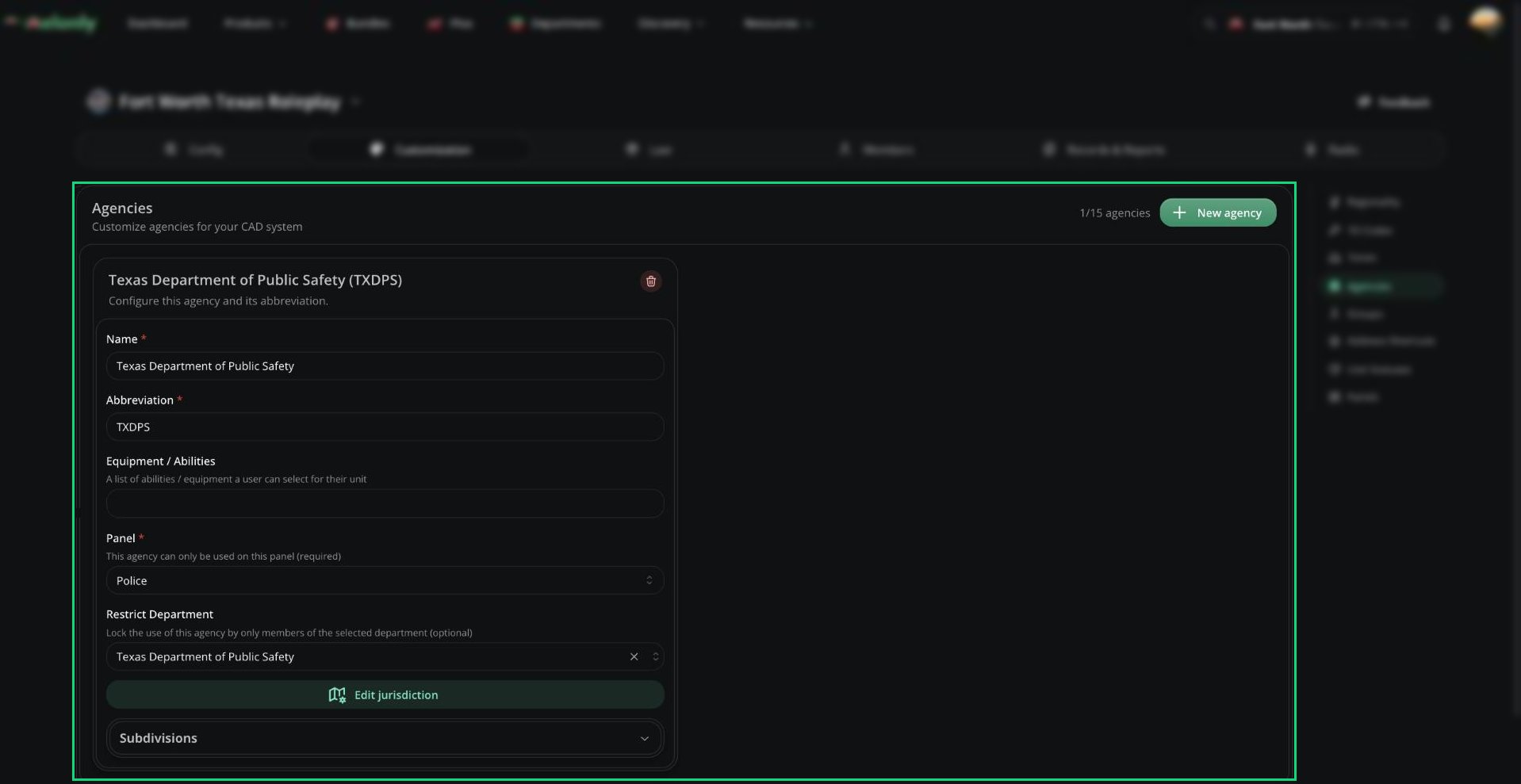 You can have up to 15 agencies. Click **New agency** to add one.
| Agency | Panel |
| - | - |
| River City Police Department (RCPD), with a Traffic Services subdivision | Police |
| Liberty County Sheriff's Office (LCSO) | Police |
| River City Fire Department (RCFD) | Fire |
| Springfield Fire Rescue (SFFR) | Fire |
| Fairview Fire Department (FVFD) | Fire |
| Liberty County Emergency Medical Services (LCEMS) | EMS |
| Liberty County Department of Transportation (LCDOT) | DOT |
| Liberty County Communications Services (LCCS) | Dispatch |
### Agency Fields
| Setting | Description |
| - | - |
| Name | The full agency name, up to 64 characters. Must be unique. |
| Abbreviation | Short form shown across the CAD, up to 8 characters. Must be unique. |
| Equipment / Abilities | Up to 16 tags units can pick, such as Spike Strip or K9. |
| Panel | The panel this agency is used on. |
| Restrict Department | Optional. Only members of this department can use the agency, and their rank is filled in from it. |
| Edit jurisdiction | Draw the agency's area on the map. See [Jurisdiction](#jurisdiction). |
Deleting an agency, or changing its abbreviation or panel, removes it from any record templates and panel restrictions that used it.
### Subdivisions
Subdivisions are specialized units within an agency, like Traffic, SWAT or K9. Each agency can have up to 4. Open Subdivisions on an agency and click **New subdivision**.
| Setting | Description |
| - | - |
| Name | Up to 64 characters, unique within the agency. |
| Abbreviation | Up to 8 characters, unique within the agency. |
| Default Equipment / Abilities | Equipment units start with, picked from the agency's list. |
| Edit jurisdiction | The subdivision's own area. It starts as a copy of the agency's. |
### Jurisdiction
Click **Edit jurisdiction** to open the map. Click **Create Custom** to add an area, then draw it with **Add Rectangle** or **Add Polygon**. Hold `Shift` while dragging to turn off snapping, and `Ctrl` + click a polygon point to delete it.
You can have up to 15 agencies. Click **New agency** to add one.
| Agency | Panel |
| - | - |
| River City Police Department (RCPD), with a Traffic Services subdivision | Police |
| Liberty County Sheriff's Office (LCSO) | Police |
| River City Fire Department (RCFD) | Fire |
| Springfield Fire Rescue (SFFR) | Fire |
| Fairview Fire Department (FVFD) | Fire |
| Liberty County Emergency Medical Services (LCEMS) | EMS |
| Liberty County Department of Transportation (LCDOT) | DOT |
| Liberty County Communications Services (LCCS) | Dispatch |
### Agency Fields
| Setting | Description |
| - | - |
| Name | The full agency name, up to 64 characters. Must be unique. |
| Abbreviation | Short form shown across the CAD, up to 8 characters. Must be unique. |
| Equipment / Abilities | Up to 16 tags units can pick, such as Spike Strip or K9. |
| Panel | The panel this agency is used on. |
| Restrict Department | Optional. Only members of this department can use the agency, and their rank is filled in from it. |
| Edit jurisdiction | Draw the agency's area on the map. See [Jurisdiction](#jurisdiction). |
Deleting an agency, or changing its abbreviation or panel, removes it from any record templates and panel restrictions that used it.
### Subdivisions
Subdivisions are specialized units within an agency, like Traffic, SWAT or K9. Each agency can have up to 4. Open Subdivisions on an agency and click **New subdivision**.
| Setting | Description |
| - | - |
| Name | Up to 64 characters, unique within the agency. |
| Abbreviation | Up to 8 characters, unique within the agency. |
| Default Equipment / Abilities | Equipment units start with, picked from the agency's list. |
| Edit jurisdiction | The subdivision's own area. It starts as a copy of the agency's. |
### Jurisdiction
Click **Edit jurisdiction** to open the map. Click **Create Custom** to add an area, then draw it with **Add Rectangle** or **Add Polygon**. Hold `Shift` while dragging to turn off snapping, and `Ctrl` + click a polygon point to delete it.
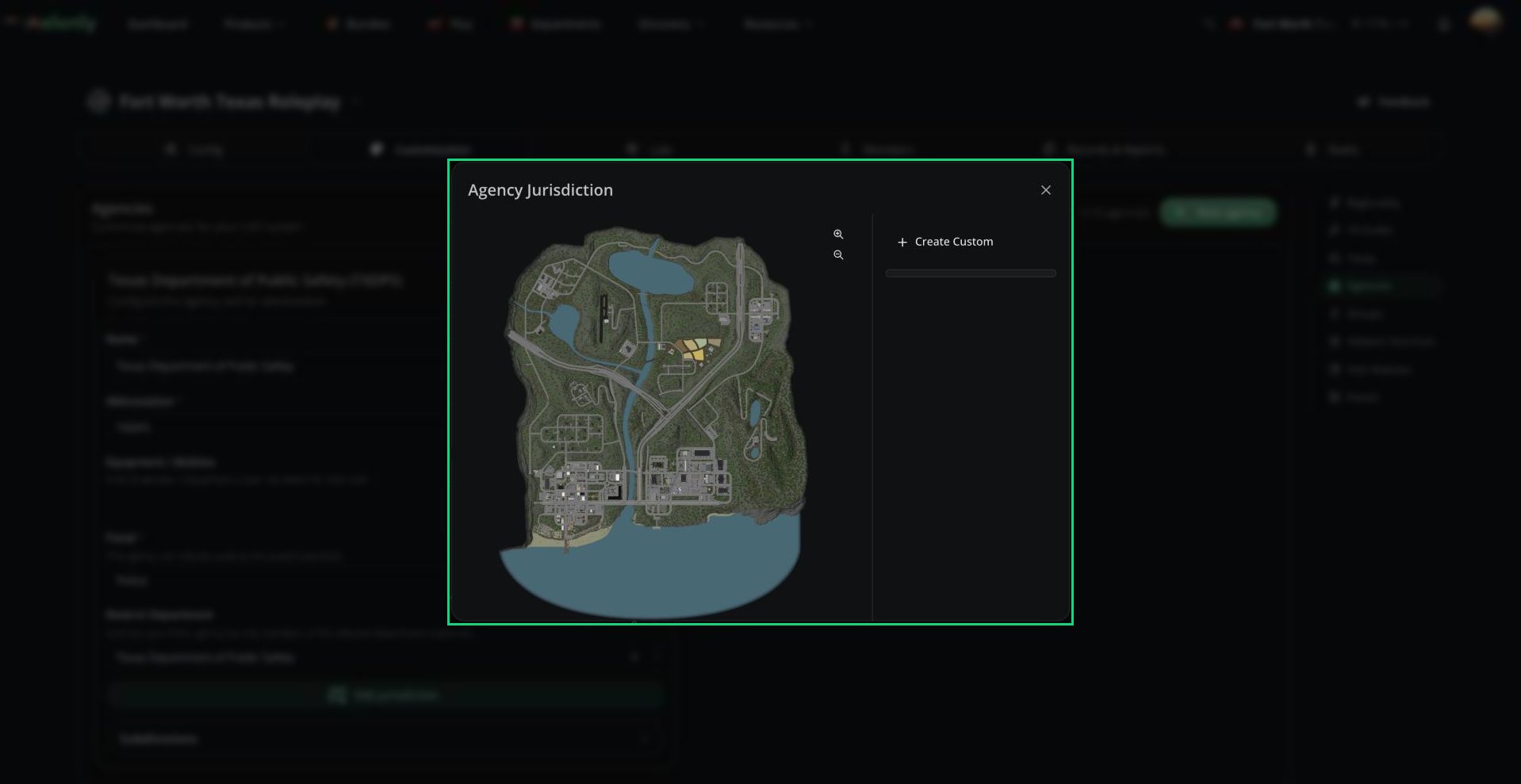 Jurisdictions matter when no dispatcher is online: field units only get the incoming call alert for calls inside their agency's area. Agencies without a jurisdiction get every alert. Unit lists can also be filtered by jurisdiction.
***
## Panels
The Panels page controls the tiles on the CAD dashboard: their names, colors, images and which agencies can use them.
Jurisdictions matter when no dispatcher is online: field units only get the incoming call alert for calls inside their agency's area. Agencies without a jurisdiction get every alert. Unit lists can also be filtered by jurisdiction.
***
## Panels
The Panels page controls the tiles on the CAD dashboard: their names, colors, images and which agencies can use them.
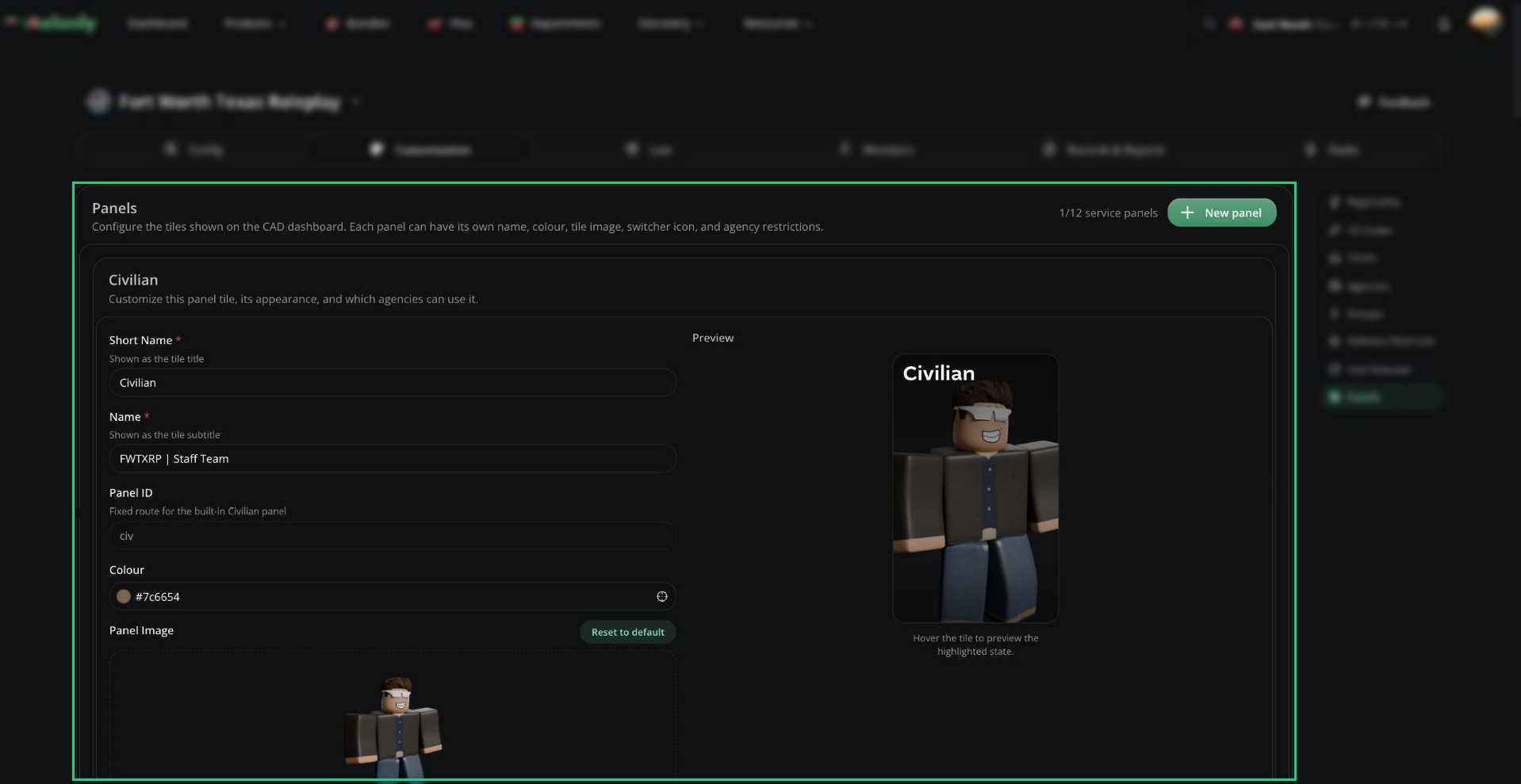 There are two kinds of panel:
* Built-in panels: Civilian, Dispatch, Law and DMV. You can restyle them, but not delete or restrict them.
* Service panels: Police, Fire, EMS and DOT. You can have up to 12, including several of one type, like separate Police and Sheriff tiles. Click **New panel** to add one.
| Setting | Description |
| - | - |
| Short Name | The tile title, up to 24 characters. |
| Name | The tile subtitle, up to 48 characters. |
| Type | Service panels only. Which panel the tile opens. |
| Panel ID | Made from the short name and used in the panel URL. You can't edit it. Built-in panels keep a fixed ID. |
| Colour | The tile's gradient color. |
| Panel Agencies | Service panels only. Limit the panel to certain agencies of its type. Leave empty to allow all. Changing the type removes agencies that no longer match. |
| Panel Image | The tile image, up to 10 MB. 420 × 680 px works best. |
| Panel Icon | Shown in the panel switcher. 128 × 128 px works best. Leave empty to use the Melonly logo. |
A live preview shows how the tile will look. Tiles appear in this order: Civilian, Dispatch, your service panels, Law, DMV.
With Panel Agencies set, only units from those agencies can join the panel, and users who can't use any of them can't open it. A tile is grayed out if your server has no department of that panel's type.
***
Still have questions? Join our Discord server for support from the Melonly Team.
This documentation is built and hosted on [Mintlify](https://mintlify.com), a developer documentation platform.
There are two kinds of panel:
* Built-in panels: Civilian, Dispatch, Law and DMV. You can restyle them, but not delete or restrict them.
* Service panels: Police, Fire, EMS and DOT. You can have up to 12, including several of one type, like separate Police and Sheriff tiles. Click **New panel** to add one.
| Setting | Description |
| - | - |
| Short Name | The tile title, up to 24 characters. |
| Name | The tile subtitle, up to 48 characters. |
| Type | Service panels only. Which panel the tile opens. |
| Panel ID | Made from the short name and used in the panel URL. You can't edit it. Built-in panels keep a fixed ID. |
| Colour | The tile's gradient color. |
| Panel Agencies | Service panels only. Limit the panel to certain agencies of its type. Leave empty to allow all. Changing the type removes agencies that no longer match. |
| Panel Image | The tile image, up to 10 MB. 420 × 680 px works best. |
| Panel Icon | Shown in the panel switcher. 128 × 128 px works best. Leave empty to use the Melonly logo. |
A live preview shows how the tile will look. Tiles appear in this order: Civilian, Dispatch, your service panels, Law, DMV.
With Panel Agencies set, only units from those agencies can join the panel, and users who can't use any of them can't open it. A tile is grayed out if your server has no department of that panel's type.
***
Still have questions? Join our Discord server for support from the Melonly Team.
This documentation is built and hosted on [Mintlify](https://mintlify.com), a developer documentation platform.