> ## Documentation Index
> Fetch the complete documentation index at: https://docs.melonly.com/llms.txt
> Use this file to discover all available pages before exploring further.
# Introduction
> Learn what Melonly CAD is, what you need to use it and how its panels fit together.
***
## What is Melonly CAD?
Melonly CAD is a computer-aided dispatch system for ER:LC roleplay communities. Your departments share one workspace for units, calls, records, radio, civilians, licences and court work.
Everyone on your server uses the same CAD, but each person only sees the panels their department ranks allow. A police officer opens the Police panel, a dispatcher opens Dispatch and civilians manage their characters from the Civilian panel.
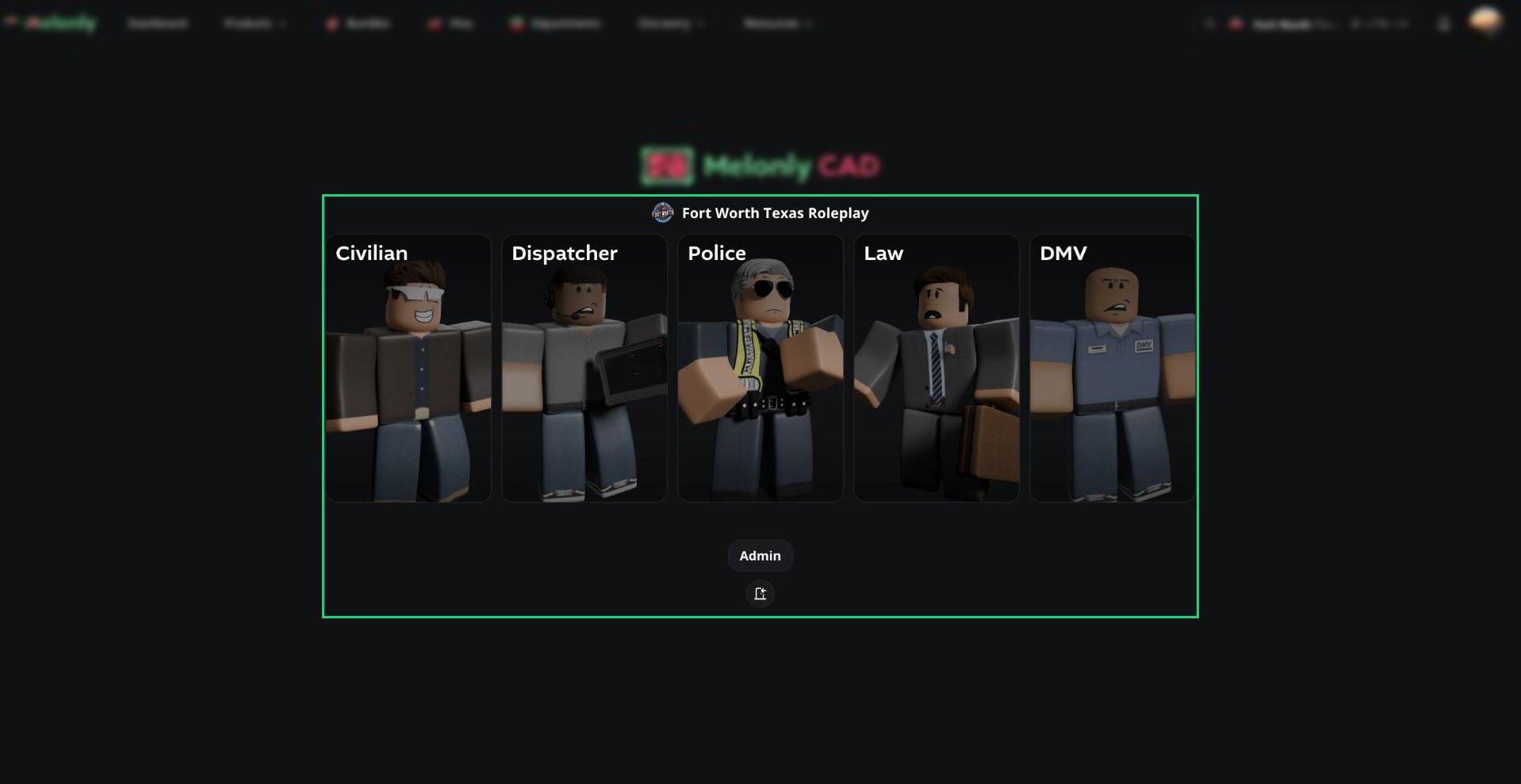 The CAD is included with every Melonly Departments plan. To get started, an admin enables it and links it to your departments. See [Getting Started](/CAD/Intro/gettingstarted).
***
## Panels
| Panel | What it's for |
| - | - |
| [Police](/CAD/User/law-enforcement) | Run names and plates, traffic stops, police records, BOLOs, warrants and licence suspensions. |
| [Fire](/CAD/User/fire) | Fire units and apparatus, calls and fire records. |
| [EMS](/CAD/User/ems) | EMS units and rigs, calls and medical records. |
| [DOT](/CAD/User/dot) | DOT units, calls and DOT records. |
| [Dispatch](/CAD/User/dispatch) | Create and assign calls, manage every unit, send tones and signals and take 911 voice calls. |
| [Civilian](/CAD/User/civilian) | Create characters, register vehicles, apply for licences, pay fines and call 911. |
| [DMV](/CAD/User/dmv) | Issue and manage licences, registrations and DMV records for any civilian. |
| [Law](/CAD/User/law) | Approve warrants, run court cases and file law records. |
Police, Fire, EMS, DOT and Dispatch each need a department of the matching Department Type. Civilian, Law and DMV just need at least one department. A server can have up to 12 service panels, for example a separate Police and Sheriff panel.
Your server can rename panels and some terms, such as 911, 10-Codes, Penal Code, DMV and the currency symbol. These docs use the default names.
***
## 🧭 Quick Navigation
### Start Here
Enable the CAD and set it up for your server.
Open a panel, join with a code and clock in.
Who can open each panel and what each permission unlocks.
The top bar, CAD menu, windows, map and desktop app.
Split panes, custom views, presets and favourites.
Audio, keybinds, radio settings and notification sounds.
### Using the CAD
Create units, change your status and use panic.
Get, join and work calls from any service panel.
Search, create and manage records and reports.
Join channels, transmit and use radio tools.
### Panel Guides
Searches, traffic stops, warrants, BOLOs and suspensions.
Fire units, apparatus, calls and records.
EMS units, rigs, calls and medical records.
DOT units, vehicles, calls and records.
Take calls, assign units and run the radio console.
Characters, licences, vehicles and calling 911.
Licences, registrations and DMV records.
Warrants, court cases and law records.
### Admin Guides
General settings, Falcon cameras, webhooks and audit logs.
Panels, agencies, 10-codes, statuses, tones and regional terms.
Units, connected users, join codes and blocked users.
Record templates, search indices and purging.
Acts, speeding, surcharges and suspensions.
Radio channels and channel groups.
An AI dispatcher that listens and responds on the radio.
***
## Video Overview
***
Still have questions? Join our Discord server for support from the Melonly Team.
This documentation is built and hosted on [Mintlify](https://mintlify.com), a developer documentation platform.
The CAD is included with every Melonly Departments plan. To get started, an admin enables it and links it to your departments. See [Getting Started](/CAD/Intro/gettingstarted).
***
## Panels
| Panel | What it's for |
| - | - |
| [Police](/CAD/User/law-enforcement) | Run names and plates, traffic stops, police records, BOLOs, warrants and licence suspensions. |
| [Fire](/CAD/User/fire) | Fire units and apparatus, calls and fire records. |
| [EMS](/CAD/User/ems) | EMS units and rigs, calls and medical records. |
| [DOT](/CAD/User/dot) | DOT units, calls and DOT records. |
| [Dispatch](/CAD/User/dispatch) | Create and assign calls, manage every unit, send tones and signals and take 911 voice calls. |
| [Civilian](/CAD/User/civilian) | Create characters, register vehicles, apply for licences, pay fines and call 911. |
| [DMV](/CAD/User/dmv) | Issue and manage licences, registrations and DMV records for any civilian. |
| [Law](/CAD/User/law) | Approve warrants, run court cases and file law records. |
Police, Fire, EMS, DOT and Dispatch each need a department of the matching Department Type. Civilian, Law and DMV just need at least one department. A server can have up to 12 service panels, for example a separate Police and Sheriff panel.
Your server can rename panels and some terms, such as 911, 10-Codes, Penal Code, DMV and the currency symbol. These docs use the default names.
***
## 🧭 Quick Navigation
### Start Here
Enable the CAD and set it up for your server.
Open a panel, join with a code and clock in.
Who can open each panel and what each permission unlocks.
The top bar, CAD menu, windows, map and desktop app.
Split panes, custom views, presets and favourites.
Audio, keybinds, radio settings and notification sounds.
### Using the CAD
Create units, change your status and use panic.
Get, join and work calls from any service panel.
Search, create and manage records and reports.
Join channels, transmit and use radio tools.
### Panel Guides
Searches, traffic stops, warrants, BOLOs and suspensions.
Fire units, apparatus, calls and records.
EMS units, rigs, calls and medical records.
DOT units, vehicles, calls and records.
Take calls, assign units and run the radio console.
Characters, licences, vehicles and calling 911.
Licences, registrations and DMV records.
Warrants, court cases and law records.
### Admin Guides
General settings, Falcon cameras, webhooks and audit logs.
Panels, agencies, 10-codes, statuses, tones and regional terms.
Units, connected users, join codes and blocked users.
Record templates, search indices and purging.
Acts, speeding, surcharges and suspensions.
Radio channels and channel groups.
An AI dispatcher that listens and responds on the radio.
***
## Video Overview
***
Still have questions? Join our Discord server for support from the Melonly Team.
This documentation is built and hosted on [Mintlify](https://mintlify.com), a developer documentation platform.