> ## Documentation Index
> Fetch the complete documentation index at: https://docs.melonly.com/llms.txt
> Use this file to discover all available pages before exploring further.
# Call Notes & Linked Records
> Keep a running log on a call with notes, link records to it and start new records filled in from the call.
***
## What are Call Notes and Linked Records?
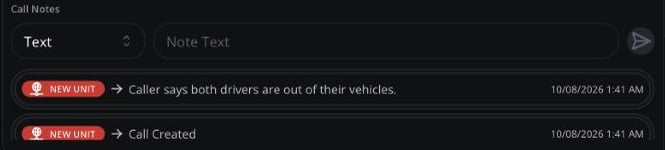
Call notes are a running log on the call. Linked records attach reports, people and vehicles to the call, so everyone on it can see them.
 ***
## Call Notes
You can add notes to calls you're on, and supervisors can add them to any call.
Choose **Text** or **Record**.
Type your note, or use the ⋯ menu to paste a copied record or look one up.
Click send.
The CAD also adds notes automatically when units join or leave, change status or the call closes.
***
## Linked Records
Records can be linked to a call, such as a report or a person you ran. Click the **Linked Records** icon next to the address to see them.
To link a record:
* Click **Add to call** in [Run](/CAD/User/lookups#run) results.
* Or click **Share** on a record, then **Send to Call**.
### Starting a Record from the Call
To start a new record filled in from the call, tick linked records, click **Create New Record**, then **Fill From** and pick a template. See [Creating a Record](/CAD/User/records/creating).
***
Still have questions? Join our Discord server for support from the Melonly Team.
This documentation is built and hosted on [Mintlify](https://mintlify.com), a developer documentation platform.
***
## Call Notes
You can add notes to calls you're on, and supervisors can add them to any call.
Choose **Text** or **Record**.
Type your note, or use the ⋯ menu to paste a copied record or look one up.
Click send.
The CAD also adds notes automatically when units join or leave, change status or the call closes.
***
## Linked Records
Records can be linked to a call, such as a report or a person you ran. Click the **Linked Records** icon next to the address to see them.
To link a record:
* Click **Add to call** in [Run](/CAD/User/lookups#run) results.
* Or click **Share** on a record, then **Send to Call**.
### Starting a Record from the Call
To start a new record filled in from the call, tick linked records, click **Create New Record**, then **Fill From** and pick a template. See [Creating a Record](/CAD/User/records/creating).
***
Still have questions? Join our Discord server for support from the Melonly Team.
This documentation is built and hosted on [Mintlify](https://mintlify.com), a developer documentation platform.