> ## Documentation Index
> Fetch the complete documentation index at: https://docs.melonly.com/llms.txt
> Use this file to discover all available pages before exploring further.
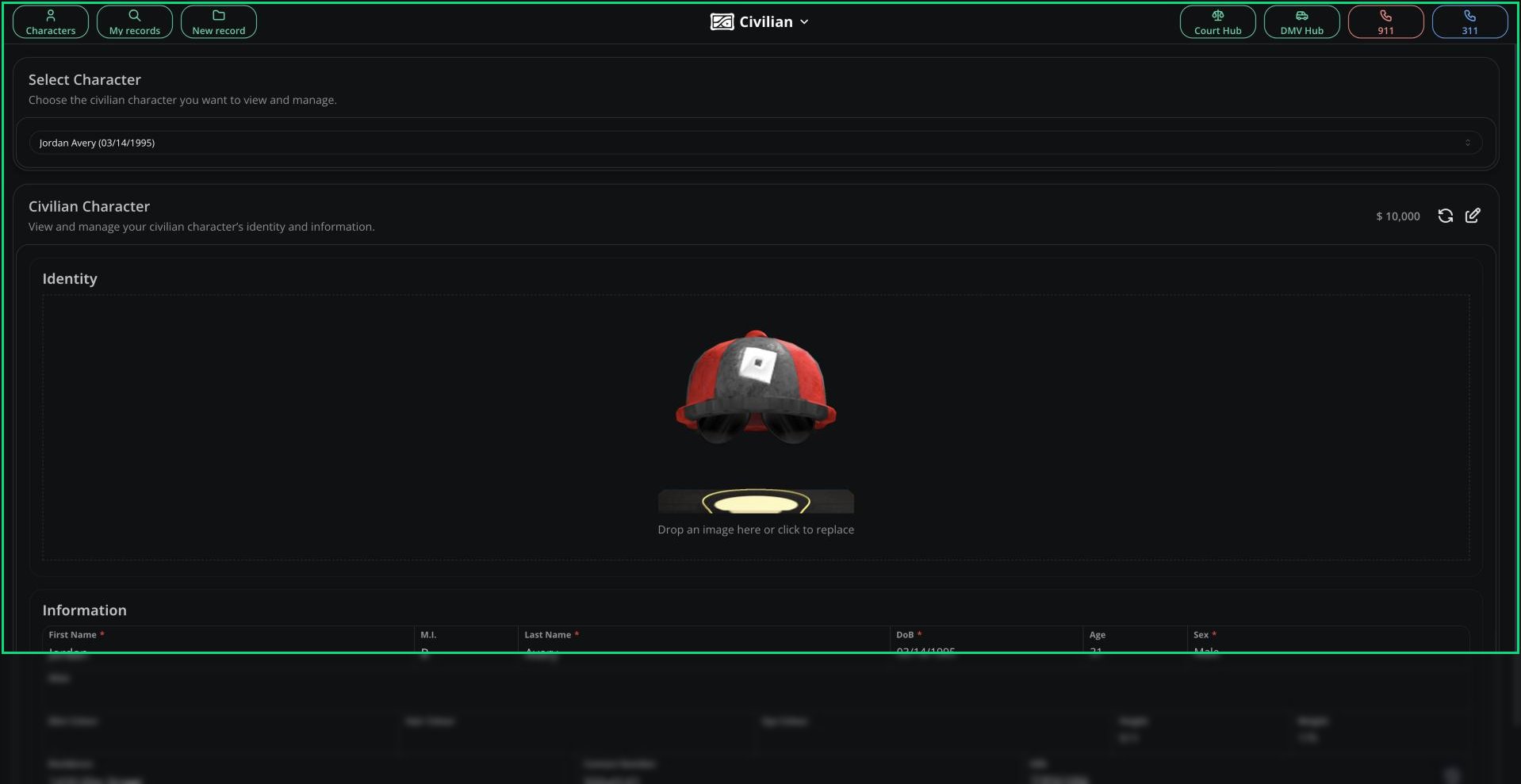
# Civilian Panel
> Create characters, register licences and vehicles and call 911 from the Civilian panel.
***
## What is the Civilian Panel?
The Civilian panel is where you roleplay as a member of the public. You create characters, give them licences and vehicles and call 911 when something happens.
Everything you do here applies to your active character, so [create and select one](/CAD/User/civilian/characters) first. Tickets, fines, court cases and renewals live in the [Court Hub and DMV Hub](/CAD/User/court-dmv-hub).
 ***
## 🧭 Quick Navigation
Create, switch, edit and delete your characters.
Register licences, vehicles and DMV records for your character.
Report an incident by text or talk to dispatch live.
Pay fines, contest tickets, post bond and renew documents.
***
## Access
You don't need to be on shift, but you do need to be in at least one CAD department.
If your server has turned on Civilian Panel Access Restriction in [CAD Configuration](/CAD/Admin/config#general-settings), you also need civilian permissions from your department rank or a temporary access code. Otherwise every CAD member can use the panel.
| Permission | Allows |
| - | - |
| civilian panel | Open the Civilian panel |
| civilian panel create | Create your own characters, licences, vehicles and DMV records |
| civilian panel edit | Edit your own licences, vehicles and DMV records |
| civilian panel delete | Delete your own licences, vehicles and DMV records |
| civilian panel supervisor | Fill in supervisor fields on the Civilian panel |
Ranks and permissions are set in [Members](/CAD/Admin/members).
***
## My Records
**My records** lists everything linked to your active character: licences, vehicles, citations, reports, warrants and more.
If your server doesn't prosecute charges automatically, records with charges have a **Request Prosecution** button. See [Request Prosecution](/CAD/User/court-dmv-hub#request-prosecution).
***
## Locked Characters
While your character is jailed, held by the court or owes bond, it's locked. You can't edit it, create records or make calls until it's released.
See [Jail and Bonds](/CAD/User/court-dmv-hub#jail-and-bonds) for how to get out.
***
Still have questions? Join our Discord server for support from the Melonly Team.
This documentation is built and hosted on [Mintlify](https://mintlify.com), a developer documentation platform.
***
## 🧭 Quick Navigation
Create, switch, edit and delete your characters.
Register licences, vehicles and DMV records for your character.
Report an incident by text or talk to dispatch live.
Pay fines, contest tickets, post bond and renew documents.
***
## Access
You don't need to be on shift, but you do need to be in at least one CAD department.
If your server has turned on Civilian Panel Access Restriction in [CAD Configuration](/CAD/Admin/config#general-settings), you also need civilian permissions from your department rank or a temporary access code. Otherwise every CAD member can use the panel.
| Permission | Allows |
| - | - |
| civilian panel | Open the Civilian panel |
| civilian panel create | Create your own characters, licences, vehicles and DMV records |
| civilian panel edit | Edit your own licences, vehicles and DMV records |
| civilian panel delete | Delete your own licences, vehicles and DMV records |
| civilian panel supervisor | Fill in supervisor fields on the Civilian panel |
Ranks and permissions are set in [Members](/CAD/Admin/members).
***
## My Records
**My records** lists everything linked to your active character: licences, vehicles, citations, reports, warrants and more.
If your server doesn't prosecute charges automatically, records with charges have a **Request Prosecution** button. See [Request Prosecution](/CAD/User/court-dmv-hub#request-prosecution).
***
## Locked Characters
While your character is jailed, held by the court or owes bond, it's locked. You can't edit it, create records or make calls until it's released.
See [Jail and Bonds](/CAD/User/court-dmv-hub#jail-and-bonds) for how to get out.
***
Still have questions? Join our Discord server for support from the Melonly Team.
This documentation is built and hosted on [Mintlify](https://mintlify.com), a developer documentation platform.