> ## Documentation Index
> Fetch the complete documentation index at: https://docs.melonly.com/llms.txt
> Use this file to discover all available pages before exploring further.
# DMV
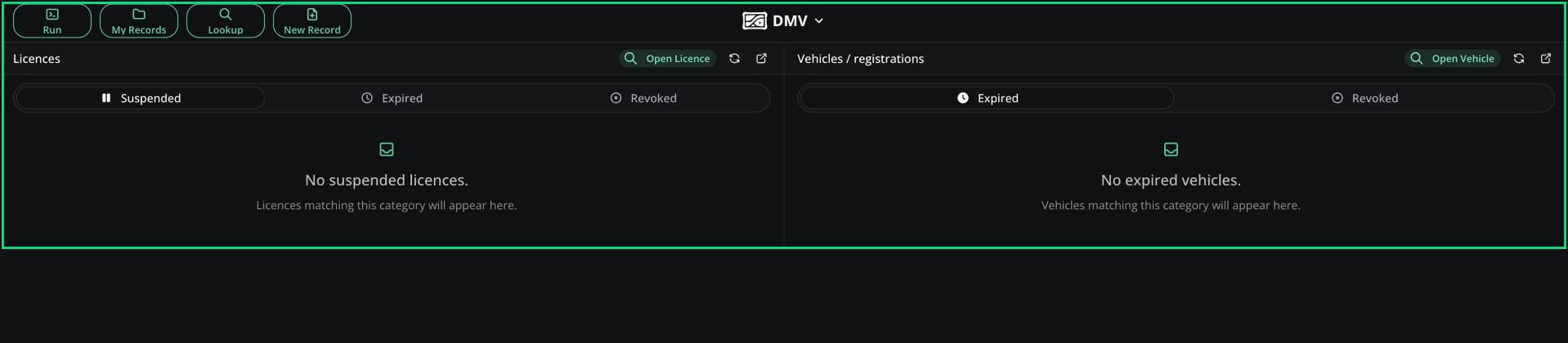
> Issue, manage, suspend and revoke licences, vehicle registrations and DMV records for any civilian from the DMV panel.
***
## What is the DMV Panel?
The DMV panel is for staff who run your server's Department of Motor Vehicles. You can issue licences, vehicle registrations and DMV records to any civilian, and manage their points, suspensions and status.
Unlike the [Civilian panel](/CAD/User/civilian), you aren't limited to your own characters, and you can use DMV-only templates. Civilians renew their own documents in the [DMV Hub](/CAD/User/court-dmv-hub#dmv-hub), not here.
 ***
## Access
You need the DMV panel permission, given on a rank in an Other type department. This one permission covers everything on the panel. See [Permissions](/CAD/Intro/permissions).
Open the **DMV** tile from the CAD homepage. You join straight away: there's no unit to create and no radio on this panel. **Run** and **Record Search** work the same as on other panels. See [Lookups](/CAD/User/lookups).
***
## Issue a Document
Click **New Record** and choose a licence, vehicle or DMV record template.
Enter the civilian's details. Unlike the Civilian panel, every field is editable.
Click **Create Record**.
The usual rules apply: one licence of each type per civilian, and licence numbers and plates must be unique. **My Records** lists the documents you've created.
### DMV-Only Templates
Admins can set any licence, vehicle or DMV record template to DMV-only in [Records & Reports](/CAD/Admin/recordsreports#template-details). Civilians can't create, edit or delete these documents themselves. Use this for documents that need a test or staff approval.
***
## Licences and Vehicles
The **Licences** card lists suspended, expired and revoked licences. The **Vehicles** card lists expired and revoked registrations. Each tab shows the 25 most recent. Click **Open Licence** or **Open Vehicle** to search for any document.
For vehicles, you can only change the status to Active or Revoked. Only the DMV panel can revoke or restore a registration. Officers can still suspend licences with the [Suspend Licence permission](/CAD/User/law-enforcement/suspending-licences).
***
## Licence Editor
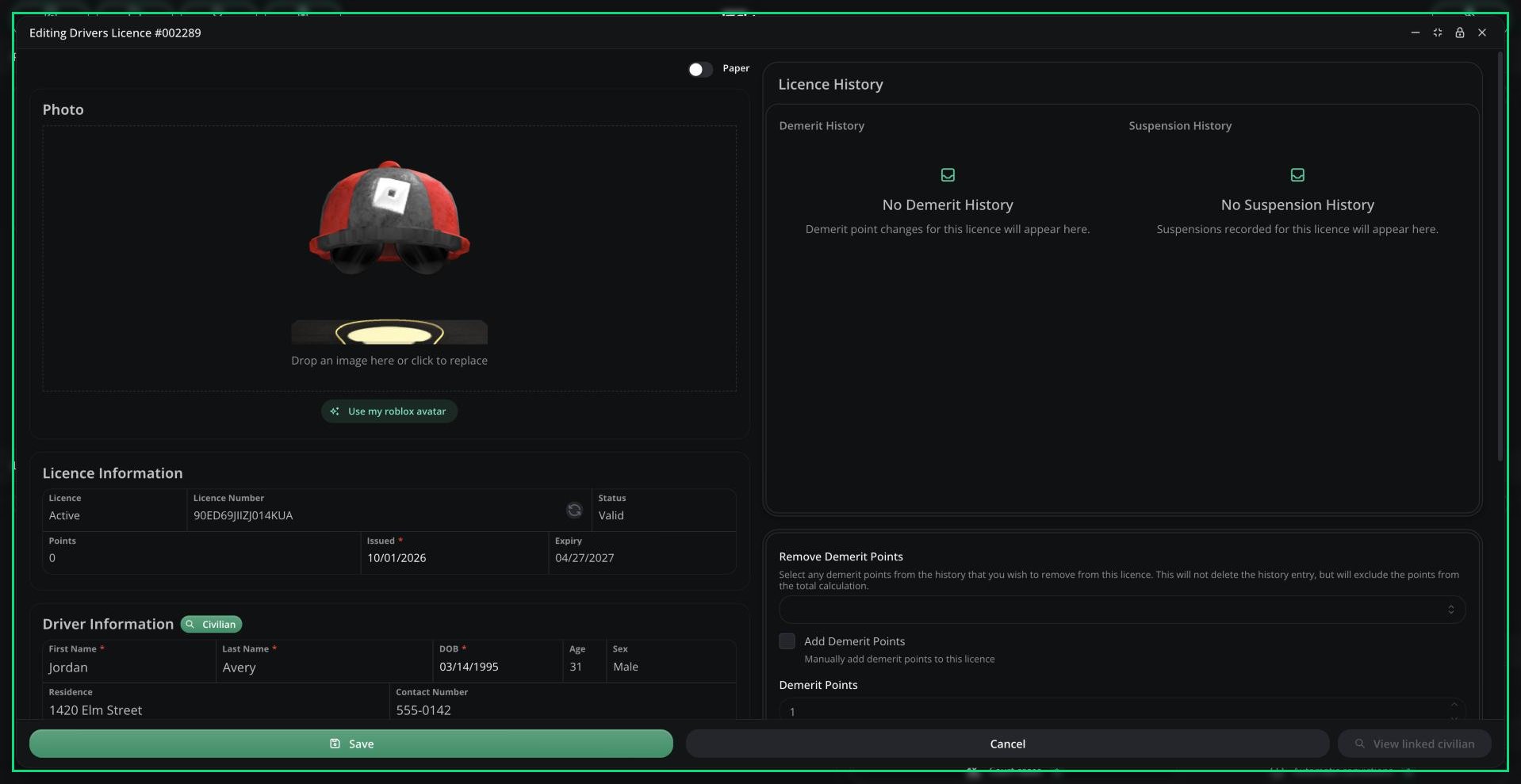
Opening a licence shows its form on the left and these controls on the right. The [Law panel](/CAD/User/law/licences) uses the same editor.
| Control | What it does |
| - | - |
| Licence History | Every demerit and suspension change |
| Remove Demerit Points | Stop past points counting toward the total. They stay in the history. |
| Add Demerit Points | Add 1 to 50 points with a reason |
| End Active Suspension | End the current suspension early |
| Suspend Licence | Start a new suspension (1 to 7300 RP days) with a reason |
| Status | Active or Revoked. Revoking ends any suspension and blocks new points and suspensions. |
| Linked Records | The civilian who owns it, their other licences, vehicles and DMV records, plus records linked to this document. Records you can't see because of agency limits are left out. |
Click **Save** to apply your changes.
The licence editor only saves status, points and suspensions. To change details like the address or photo, open the licence as a record and click **Edit**.
***
## Access
You need the DMV panel permission, given on a rank in an Other type department. This one permission covers everything on the panel. See [Permissions](/CAD/Intro/permissions).
Open the **DMV** tile from the CAD homepage. You join straight away: there's no unit to create and no radio on this panel. **Run** and **Record Search** work the same as on other panels. See [Lookups](/CAD/User/lookups).
***
## Issue a Document
Click **New Record** and choose a licence, vehicle or DMV record template.
Enter the civilian's details. Unlike the Civilian panel, every field is editable.
Click **Create Record**.
The usual rules apply: one licence of each type per civilian, and licence numbers and plates must be unique. **My Records** lists the documents you've created.
### DMV-Only Templates
Admins can set any licence, vehicle or DMV record template to DMV-only in [Records & Reports](/CAD/Admin/recordsreports#template-details). Civilians can't create, edit or delete these documents themselves. Use this for documents that need a test or staff approval.
***
## Licences and Vehicles
The **Licences** card lists suspended, expired and revoked licences. The **Vehicles** card lists expired and revoked registrations. Each tab shows the 25 most recent. Click **Open Licence** or **Open Vehicle** to search for any document.
For vehicles, you can only change the status to Active or Revoked. Only the DMV panel can revoke or restore a registration. Officers can still suspend licences with the [Suspend Licence permission](/CAD/User/law-enforcement/suspending-licences).
***
## Licence Editor
Opening a licence shows its form on the left and these controls on the right. The [Law panel](/CAD/User/law/licences) uses the same editor.
| Control | What it does |
| - | - |
| Licence History | Every demerit and suspension change |
| Remove Demerit Points | Stop past points counting toward the total. They stay in the history. |
| Add Demerit Points | Add 1 to 50 points with a reason |
| End Active Suspension | End the current suspension early |
| Suspend Licence | Start a new suspension (1 to 7300 RP days) with a reason |
| Status | Active or Revoked. Revoking ends any suspension and blocks new points and suspensions. |
| Linked Records | The civilian who owns it, their other licences, vehicles and DMV records, plus records linked to this document. Records you can't see because of agency limits are left out. |
Click **Save** to apply your changes.
The licence editor only saves status, points and suspensions. To change details like the address or photo, open the licence as a record and click **Edit**.
 ***
## Template Options
Admins set these per template in [Records & Reports](/CAD/Admin/recordsreports#template-details).
| Option | Applies to | Description |
| - | - | - |
| DMV-only creation | All | Only the DMV panel can create these documents |
| Expiration | All | RP days until it expires. For DMV records, 0 means never. |
| Renewal Cost | All | What a civilian pays to renew it in the [DMV Hub](/CAD/User/court-dmv-hub#dmv-hub) |
| Block renewal for unpaid tickets | Licence, Vehicle | Can't be renewed while a linked ticket is unpaid |
| Max Points | Licence | The demerit point limit |
| Points Dropoff | Licence | How long points count before they drop off |
| Max Points Action | Licence | What happens at the limit: nothing, revocation, a [court hearing](/CAD/User/court-cases) or a suspension |
| Max Points Suspension Duration | Licence | How long that suspension lasts |
***
Still have questions? Join our Discord server for support from the Melonly Team.
This documentation is built and hosted on [Mintlify](https://mintlify.com), a developer documentation platform.
***
## Template Options
Admins set these per template in [Records & Reports](/CAD/Admin/recordsreports#template-details).
| Option | Applies to | Description |
| - | - | - |
| DMV-only creation | All | Only the DMV panel can create these documents |
| Expiration | All | RP days until it expires. For DMV records, 0 means never. |
| Renewal Cost | All | What a civilian pays to renew it in the [DMV Hub](/CAD/User/court-dmv-hub#dmv-hub) |
| Block renewal for unpaid tickets | Licence, Vehicle | Can't be renewed while a linked ticket is unpaid |
| Max Points | Licence | The demerit point limit |
| Points Dropoff | Licence | How long points count before they drop off |
| Max Points Action | Licence | What happens at the limit: nothing, revocation, a [court hearing](/CAD/User/court-cases) or a suspension |
| Max Points Suspension Duration | Licence | How long that suspension lasts |
***
Still have questions? Join our Discord server for support from the Melonly Team.
This documentation is built and hosted on [Mintlify](https://mintlify.com), a developer documentation platform.