> ## Documentation Index
> Fetch the complete documentation index at: https://docs.melonly.com/llms.txt
> Use this file to discover all available pages before exploring further.
# Discord integration
> Connect Melonly to your Discord server for logs, role sync, and verification
Discord integration links Melonly events (shifts, moderation, LOAs, voting, and more) to channels and roles in your Discord server.
## Set up integration
Go to the **Discord Integration** page in your Melonly dashboard.
Select the Discord server you want to connect.
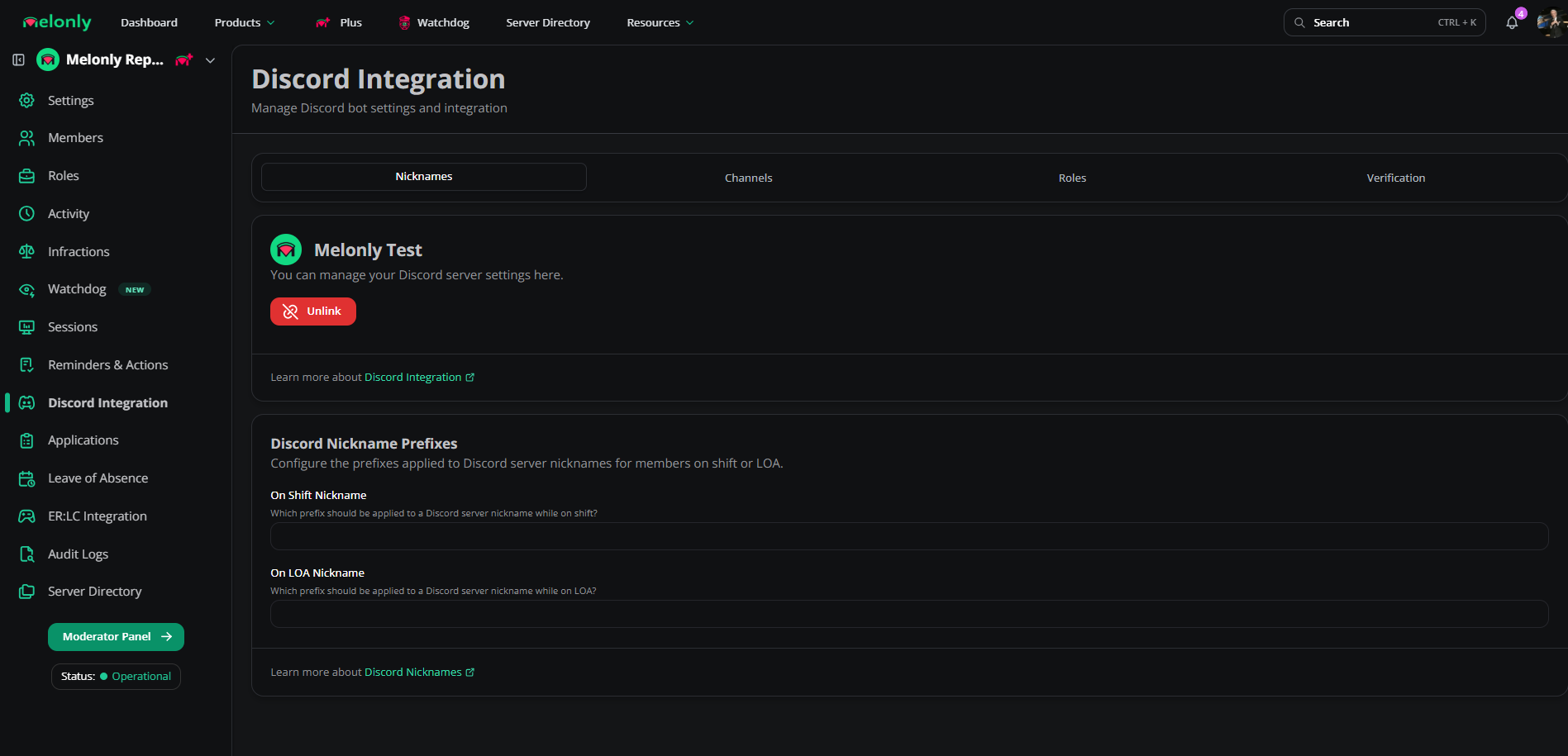
Use the three tabs (Channels, Roles, Nicknames) to map Melonly events to Discord. Once a channel is set, Melonly posts a confirmation embed there.
 ## Channels
| Channel | What gets sent |
| - | - |
| Shift Logs | Every shift event |
| Moderation Logs | Log create / edit / delete actions |
| Leave of Absences | LOA submissions and updates |
| Voting Channel | Server-directory votes |
| Reviews | New reviews and their content |
| Audit Logs | Administrative actions in the Melonly panel |
| Activity End Wave Channel | End of each activity wave |
## Roles
| Role | When it's assigned |
| - | - |
| On Shift | While a member is on shift |
| On Break | While a member is on break |
| LOA | While a member is on leave |
| LOA Submission Mention | Pinged when an LOA is submitted |
| Voter | Given to users who vote in the directory |
## Nicknames
| Nickname | When it's applied |
| - | - |
| On Shift | Prefix added while on shift |
| On LOA | Prefix added while on leave |
## Channel overrides
Split log types into separate channels. For example, one channel for moderation logs (bans, warnings) and another for audit logs (role updates, panel changes).
## Verification
Melonly's verification system links Discord accounts to Roblox identities.
### Configure
| Setting | Description |
| - | - |
| Verification Enabled | Master toggle for verification |
| Auto Verification | Auto-verifies users who already verified with Melonly |
| Roblox Username Sync | Syncs Discord nicknames to Roblox usernames |
| Verify Channel | Channel for welcome messages or static buttons |
| Main Verification Type | Primary verification flow |
| Command Enabled | Enables the `/verify` command |
### Verification types
| Type | How it works |
| - | - |
| Direct Message | DMs the user a verification prompt |
| Static Button | Users click a button in the verify channel |
| Slash Command | Users run `/verify` |
| Welcome Channel | Pings the user in a welcome channel |
### Requirements
| Requirement | Description |
| - | - |
| Roblox Group | User must be in a specified Roblox group, optionally with a minimum role |
| Roblox Age | User's Roblox account must meet a minimum age |
Still have questions? Join our [Discord server](https://melonly.xyz/discord) for support from the Melonly team.
This documentation is built and hosted on [Mintlify](https://mintlify.com), a developer documentation platform.
## Channels
| Channel | What gets sent |
| - | - |
| Shift Logs | Every shift event |
| Moderation Logs | Log create / edit / delete actions |
| Leave of Absences | LOA submissions and updates |
| Voting Channel | Server-directory votes |
| Reviews | New reviews and their content |
| Audit Logs | Administrative actions in the Melonly panel |
| Activity End Wave Channel | End of each activity wave |
## Roles
| Role | When it's assigned |
| - | - |
| On Shift | While a member is on shift |
| On Break | While a member is on break |
| LOA | While a member is on leave |
| LOA Submission Mention | Pinged when an LOA is submitted |
| Voter | Given to users who vote in the directory |
## Nicknames
| Nickname | When it's applied |
| - | - |
| On Shift | Prefix added while on shift |
| On LOA | Prefix added while on leave |
## Channel overrides
Split log types into separate channels. For example, one channel for moderation logs (bans, warnings) and another for audit logs (role updates, panel changes).
## Verification
Melonly's verification system links Discord accounts to Roblox identities.
### Configure
| Setting | Description |
| - | - |
| Verification Enabled | Master toggle for verification |
| Auto Verification | Auto-verifies users who already verified with Melonly |
| Roblox Username Sync | Syncs Discord nicknames to Roblox usernames |
| Verify Channel | Channel for welcome messages or static buttons |
| Main Verification Type | Primary verification flow |
| Command Enabled | Enables the `/verify` command |
### Verification types
| Type | How it works |
| - | - |
| Direct Message | DMs the user a verification prompt |
| Static Button | Users click a button in the verify channel |
| Slash Command | Users run `/verify` |
| Welcome Channel | Pings the user in a welcome channel |
### Requirements
| Requirement | Description |
| - | - |
| Roblox Group | User must be in a specified Roblox group, optionally with a minimum role |
| Roblox Age | User's Roblox account must meet a minimum age |
Still have questions? Join our [Discord server](https://melonly.xyz/discord) for support from the Melonly team.
This documentation is built and hosted on [Mintlify](https://mintlify.com), a developer documentation platform.