> ## Documentation Index
> Fetch the complete documentation index at: https://docs.melonly.com/llms.txt
> Use this file to discover all available pages before exploring further.
# ER:LC Integration
> Connect Melonly to your ER:LC private server for VSM, automation and live logs.
***
The ER:LC integration links Melonly to your private server for Virtual Server Management (VSM), member checks, in-game logs, automation and more. Each section below links to its full page.
***
## Set Up the Integration
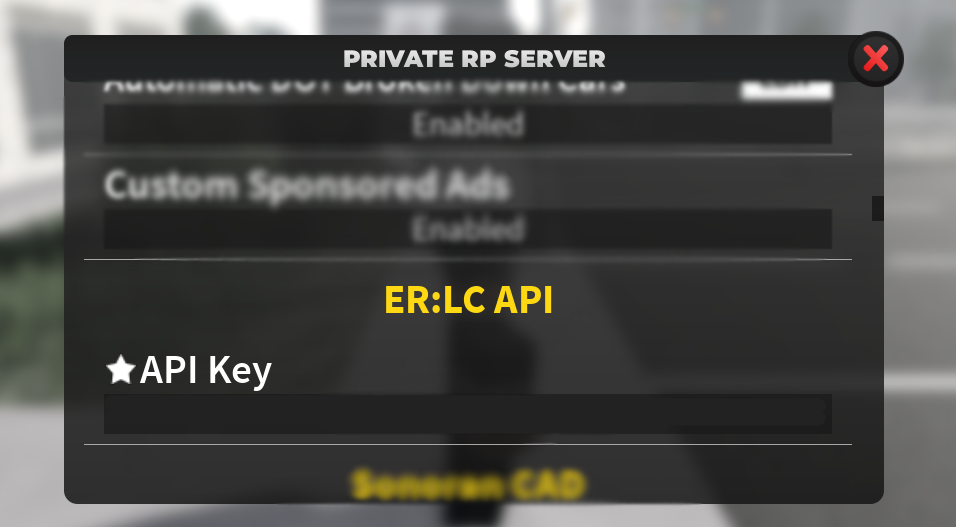
Join your ER:LC private server and open **Private Server Settings → ER:LC API**. Copy your unique key.
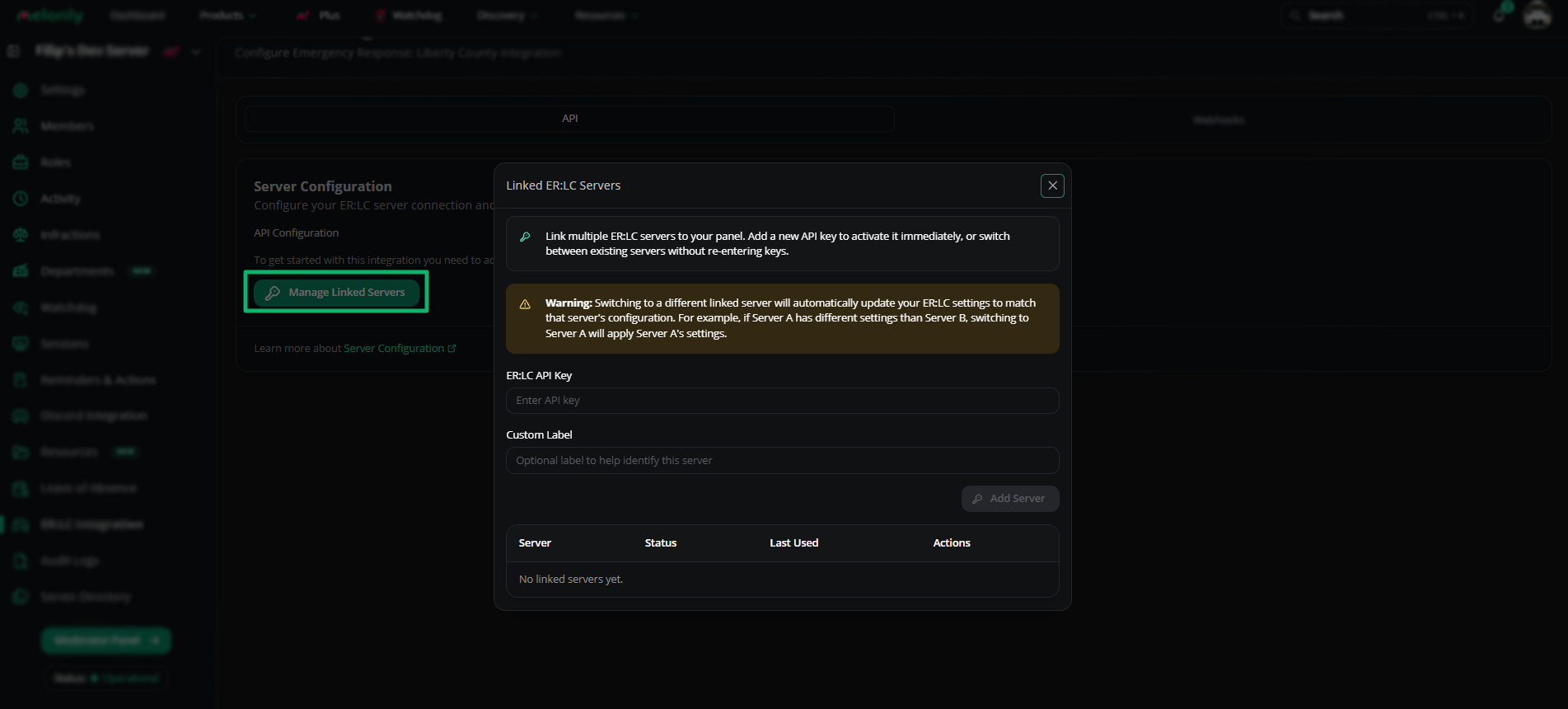
 On your dashboard's **ER:LC Integration** page, click **Manage linked servers**. Paste your API key, enter a label and click **Add Server**. Server info appears next to the setup button.
You can add several API keys and switch between linked servers. Each key keeps its own settings.
On your dashboard's **ER:LC Integration** page, click **Manage linked servers**. Paste your API key, enter a label and click **Add Server**. Server info appears next to the setup button.
You can add several API keys and switch between linked servers. Each key keeps its own settings.
 VSM and member checks become available as soon as a key is set.
***
## ER:LC API
These settings are on the **ER:LC Integration → API** page.
### Server Configuration
| Setting | Description |
| - | - |
| API Configuration | Set or update your ER:LC API key |
| Server Name | The linked private server's name |
| Players | Live player count. Can take up to 5 minutes to refresh. |
| Join Code | Your private server join code, or use Join Server |
See [Server Configuration](/Dashboard/erlcintegration/api/serverconfig).
### Raid Rollback
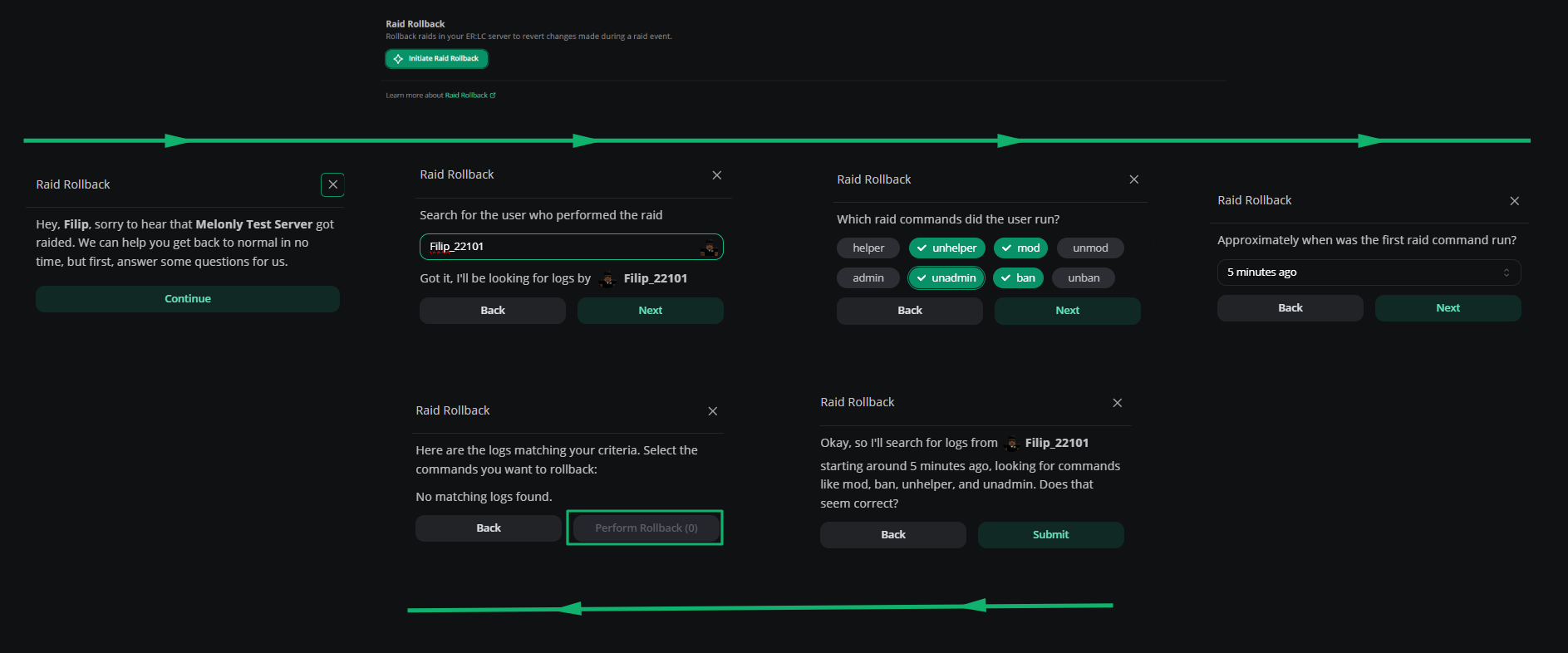
Revert the commands a raider ran. Answer a few prompts and Melonly handles the rest. See [Raid Rollback](/Dashboard/erlcintegration/api/raidrollback).
VSM and member checks become available as soon as a key is set.
***
## ER:LC API
These settings are on the **ER:LC Integration → API** page.
### Server Configuration
| Setting | Description |
| - | - |
| API Configuration | Set or update your ER:LC API key |
| Server Name | The linked private server's name |
| Players | Live player count. Can take up to 5 minutes to refresh. |
| Join Code | Your private server join code, or use Join Server |
See [Server Configuration](/Dashboard/erlcintegration/api/serverconfig).
### Raid Rollback
Revert the commands a raider ran. Answer a few prompts and Melonly handles the rest. See [Raid Rollback](/Dashboard/erlcintegration/api/raidrollback).
 ### Event Logs
Forward ER:LC events to Discord channels. Requires [Melonly Plus](https://melonly.xyz/plus). See [Event Logs](/Dashboard/erlcintegration/api/eventlogs).
| Setting | Description |
| - | - |
| Join Logs Channel | ER:LC join events |
| Leave Logs Channel | ER:LC leave events |
| Kill Logs Channel | ER:LC kill events |
| Mod Call Logs Channel | ER:LC mod calls |
### AFK Inactivity Checks
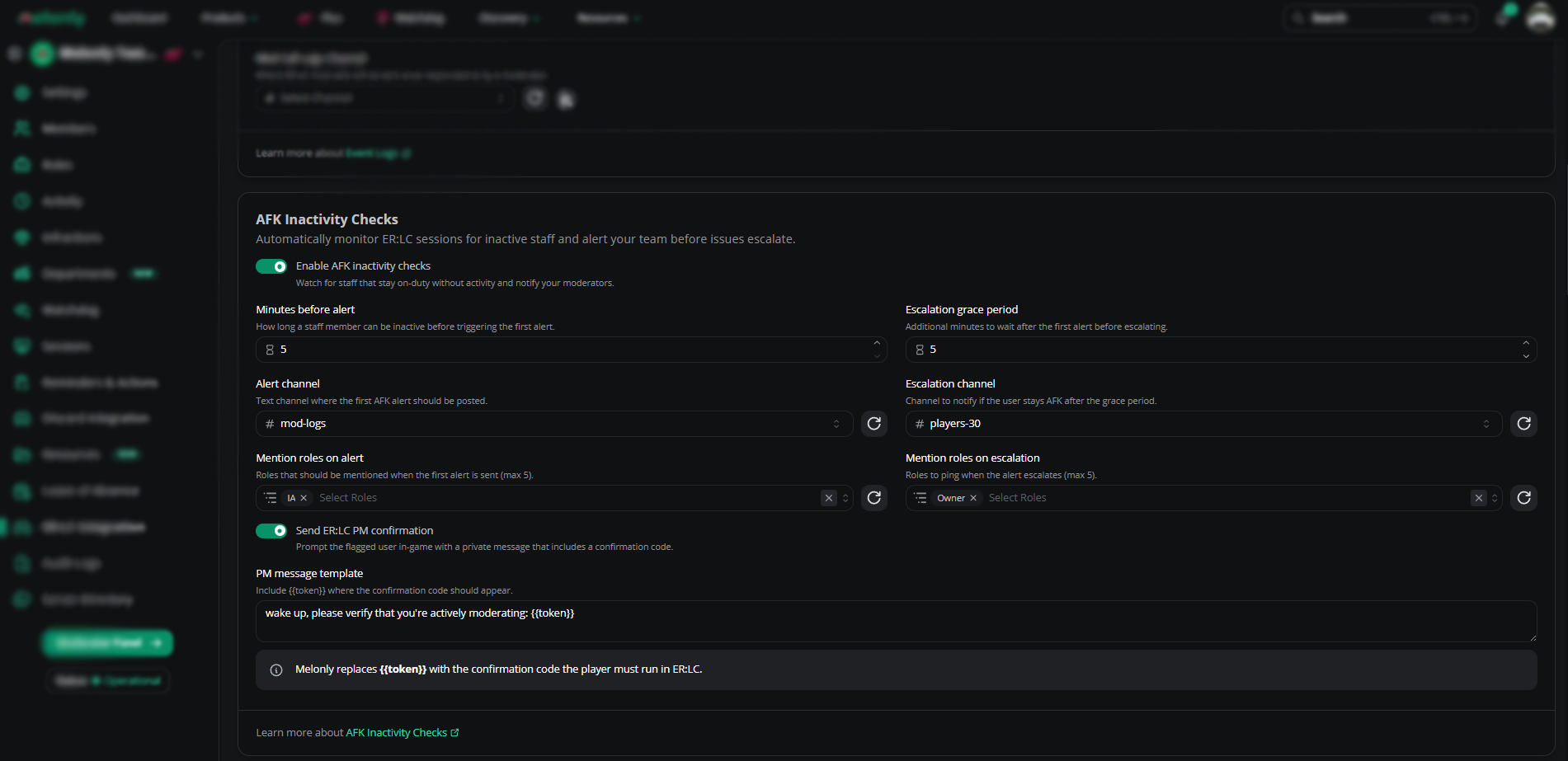
Check that on-duty staff are actually moderating. Flagged staff get a PM with a code they must run in game. See [AFK Inactivity Checks](/Dashboard/erlcintegration/api/afkchecks).
| Setting | Description |
| - | - |
| Minutes Before Alert | Time before the first alert |
| Alert Channel | Where the first alert posts |
| Mention Roles on Alert | Roles pinged on the first alert |
| Escalation Grace Period | Time before escalation |
| Escalation Channel | Where the escalation posts |
| Mention Roles on Escalation | Roles pinged on escalation |
| Send ER:LC PM Confirmation | Sends the PM with the confirmation code |
| Confirmation Command | The `:log {code}` command staff must run |
### Event Logs
Forward ER:LC events to Discord channels. Requires [Melonly Plus](https://melonly.xyz/plus). See [Event Logs](/Dashboard/erlcintegration/api/eventlogs).
| Setting | Description |
| - | - |
| Join Logs Channel | ER:LC join events |
| Leave Logs Channel | ER:LC leave events |
| Kill Logs Channel | ER:LC kill events |
| Mod Call Logs Channel | ER:LC mod calls |
### AFK Inactivity Checks
Check that on-duty staff are actually moderating. Flagged staff get a PM with a code they must run in game. See [AFK Inactivity Checks](/Dashboard/erlcintegration/api/afkchecks).
| Setting | Description |
| - | - |
| Minutes Before Alert | Time before the first alert |
| Alert Channel | Where the first alert posts |
| Mention Roles on Alert | Roles pinged on the first alert |
| Escalation Grace Period | Time before escalation |
| Escalation Channel | Where the escalation posts |
| Mention Roles on Escalation | Roles pinged on escalation |
| Send ER:LC PM Confirmation | Sends the PM with the confirmation code |
| Confirmation Command | The `:log {code}` command staff must run |
 ### Restrictions
Team and vehicle restrictions don't run on their own. Create a reminder on the [Reminders](/Dashboard/reminders-actions/reminders) page to run the checks.
#### Team Restrictions
Lock teams behind Discord roles or Melonly departments. See [Team Restrictions](/Dashboard/erlcintegration/api/teamrestrictions).
| Setting | Description |
| - | - |
| Role Requirement | The team requires a Discord role |
| Department Restriction | The team requires a Melonly department |
| Combined Requirement | Both the role and the department are required |
| Alert Message | The PM sent to a player before they're kicked off the team |
| Minimum Playercount | The player count at which restrictions start |
#### Vehicle Restrictions
Lock vehicles behind a Discord role. Players without the role are flagged in the panel or by reminders. See [Vehicle Restrictions](/Dashboard/erlcintegration/api/vehiclerestrictions).
### Safe Zone Enforcement
See [Safe Zone Enforcement](/Dashboard/erlcintegration/api/safezoneenforcement).
| Setting | Description |
| - | - |
| Safe Zone Enforcement | Turns the feature on or off |
| Open Safe Zone Editor | Opens the safe zone editor. See [Map Editor](/Learnmore/editlocation). |
| Warnings Before Action | Warnings given before action is taken |
| Action After Warnings | The punishment once the warning limit is reached |
| Create Moderation Record | Logs the punishment in moderation history |
### Restrictions
Team and vehicle restrictions don't run on their own. Create a reminder on the [Reminders](/Dashboard/reminders-actions/reminders) page to run the checks.
#### Team Restrictions
Lock teams behind Discord roles or Melonly departments. See [Team Restrictions](/Dashboard/erlcintegration/api/teamrestrictions).
| Setting | Description |
| - | - |
| Role Requirement | The team requires a Discord role |
| Department Restriction | The team requires a Melonly department |
| Combined Requirement | Both the role and the department are required |
| Alert Message | The PM sent to a player before they're kicked off the team |
| Minimum Playercount | The player count at which restrictions start |
#### Vehicle Restrictions
Lock vehicles behind a Discord role. Players without the role are flagged in the panel or by reminders. See [Vehicle Restrictions](/Dashboard/erlcintegration/api/vehiclerestrictions).
### Safe Zone Enforcement
See [Safe Zone Enforcement](/Dashboard/erlcintegration/api/safezoneenforcement).
| Setting | Description |
| - | - |
| Safe Zone Enforcement | Turns the feature on or off |
| Open Safe Zone Editor | Opens the safe zone editor. See [Map Editor](/Learnmore/editlocation). |
| Warnings Before Action | Warnings given before action is taken |
| Action After Warnings | The punishment once the warning limit is reached |
| Create Moderation Record | Logs the punishment in moderation history |
 ### Team Jurisdictions
See [Team Jurisdictions](/Dashboard/erlcintegration/api/teamjurisdictions).
| Setting | Description |
| - | - |
| Police Jurisdiction | The area assigned to Police |
| Sheriff Jurisdiction | The area assigned to Sheriff |
| Fire Department Jurisdiction | The area assigned to Fire |
| DOT Jurisdiction | The area assigned to DOT |
| Open Jurisdiction Editor | Opens the editor. See [Map Editor](/Learnmore/editlocation). |
| Minutes Allowed Outside of Jurisdiction | Time before warnings start |
| Number of PM Warnings Before Action | PM warnings given before action is taken |
| Jurisdiction Enforcement Action | The action once the warning limit is reached |
| Exclude Moderators | Moderators aren't affected |
### Team Jurisdictions
See [Team Jurisdictions](/Dashboard/erlcintegration/api/teamjurisdictions).
| Setting | Description |
| - | - |
| Police Jurisdiction | The area assigned to Police |
| Sheriff Jurisdiction | The area assigned to Sheriff |
| Fire Department Jurisdiction | The area assigned to Fire |
| DOT Jurisdiction | The area assigned to DOT |
| Open Jurisdiction Editor | Opens the editor. See [Map Editor](/Learnmore/editlocation). |
| Minutes Allowed Outside of Jurisdiction | Time before warnings start |
| Number of PM Warnings Before Action | PM warnings given before action is taken |
| Jurisdiction Enforcement Action | The action once the warning limit is reached |
| Exclude Moderators | Moderators aren't affected |
 ### VC Server Status
Voice channels whose names update with live server data. Requires Plus. See [VC Server Status](/Dashboard/erlcintegration/api/vcserverstatus).
| Type | Displays |
| - | - |
| Playercount VC | The number of players in game |
| Queue VC | The number of players in the queue |
### Voice Channel Configurations
Give voice channels abbreviations for the in-game `;vc` command. If `s1` maps to the Scene 1 channel, running `;vc s1` moves you into Scene 1 (you must already be in a voice channel). Use `;vc [usernames] [abbreviation]` to move other players.
Anyone can use an abbreviation unless **Staff Only** is turned on for it. See [Voice Channel Configurations](/Dashboard/erlcintegration/api/voicechannelconfig).
### Ban BOLO
See [Ban BOLO](/Dashboard/erlcintegration/api/banbolo).
| Setting | Description |
| - | - |
| Manual Completion | Staff with the ER:LC Admin and Ban permissions can ban players when approving a Ban BOLO |
| Automatic Completion | Bans players with an active Ban BOLO when they join |
### Shift Automation
Requires Plus and a linked Roblox account. See [Shift Automation](/Dashboard/erlcintegration/api/shiftautomation).
| Setting | Description |
| - | - |
| Automatic Shift Start | Starts a shift when staff join the ER:LC server |
| Automatic Shift End | Ends a shift when staff leave the ER:LC server |
### Punishment Controls
Requires Plus. See [Punishment Controls](/Dashboard/erlcintegration/api/punishmentcontrols).
| Setting | Description |
| - | - |
| Punishment Rejoin Timer | If a kicked player rejoins within this time, Melonly punishes them again |
| Kick or Ban | The punishment for rejoining |
### Welcome Messages
See [Welcome Messages](/Dashboard/erlcintegration/api/welcomemessage).
| Setting | Description |
| - | - |
| Welcome Message | A PM sent to players when they join |
### Permission Management
Requires Plus. See [Permission Management](/Dashboard/erlcintegration/api/permissionmanagement).
| Setting | Description |
| - | - |
| Automatic Permission Removal | Removes in-game permissions when a user leaves the linked Melonly server |
### Username Moderation
See [Username Moderation](/Dashboard/erlcintegration/api/usernamemoderation).
| Setting | Description |
| - | - |
| Kick "All/Others" Usernames | Kicks anyone whose username starts with `all` or `others` |
### Weather and Time Sync
Requires Plus. Turn off the in-game weather cycle in your ER:LC server settings first. See [Weather and Time Sync](/Dashboard/erlcintegration/api/weathertimesync).
| Setting | Description |
| - | - |
| City Name | The city to sync with |
| Sync Weather | Matches in-game weather to the city |
| Sync Time | Matches in-game time to the city |
***
## Webhooks
These settings are on the **ER:LC Integration → Webhooks** page.
### ER:LC Webhook Channel
Requires PRC command logs in your Discord server. See [PRC's setup video](https://www.youtube.com/watch?v=9tPJGtIe6IQ).
| Setting | Description |
| - | - |
| Webhook Channel | The channel for command webhooks from PRC |
| Alternative Channel | The channel for punishment, kick and ban webhooks from PRC |
| Events Webhook Link | Copy this link into the Events Webhook setting of your PRC server |
See [Webhook Configuration](/Dashboard/erlcintegration/webhook/webhookconfig) and [ER:LC Events Webhook](/Dashboard/erlcintegration/webhook/eventwebhook).
### Auto-Log Kicks and Bans
Logs every kick and ban in your ER:LC server. Add reasons later by editing the log in the Mod Panel. See [Logging Settings](/Dashboard/erlcintegration/webhook/loggingsettings).
### `:log` Punish Command
The `:log` command lets staff log punishments from in game. It needs a [linked Roblox account](https://melonly.xyz/my/account). Custom log types work too, once you set them up on the dashboard.
| Command | Action |
| - | - |
| `:log note [username] [reason]` | Logs a note |
| `:log warn [username] [reason]` | Logs a warning |
| `:log kick [username] [reason]` | Logs a kick |
| `:log bolo [username] [reason]` | Logs a Ban BOLO |
| `:log ban [username] [reason]` | Logs a ban |
| `:log vehicle [user/plate]` | Looks up the player or vehicle |
| `:log chasing` | PMs you who you appear to be chasing, based on recent player locations |
| `:log vc [abbreviation]` | Moves you to a voice channel |
| `:log vc [username] [abbreviation]` | Moves a player to a voice channel |
### Off-Duty Commands Alert
Catch staff using moderation commands while off duty. See [Off-Duty Commands Alert](/Dashboard/erlcintegration/webhook/offdutycommands).
| Setting | Description |
| - | - |
| Enable Off-Duty Commands Alert | Turns the feature on or off |
| Alert Channel | The channel for alerts |
| Mention Roles in Alert | Roles pinged on alerts, up to 5 |
| Allowed Commands | Commands allowed off duty |
| Allowed Roles | Roles that never trigger alerts |
### Mass Command Alerts
Flag server-wide commands like `:ban all` and post an alert. See [Mass Command Alerts](/Dashboard/erlcintegration/webhook/masscommandalerts).
| Setting | Description |
| - | - |
| Commands to Monitor | The commands tracked, such as `:unmod`, `:ban` or `:kick` |
| Targets That Trigger an Alert | `all`, `others` or both |
| Mention Roles on Alert | Roles pinged, up to 5 |
| Alert Delivery Channel | Where alerts post. Leave it empty to post in your webhook channel. |
| Minimum Players Affected | Only alerts when at least this many players are affected |
| Alert Cooldown | Minimum time between alerts for the same command and target |
***
## Playtime Levels
These settings are on the **ER:LC Integration → Playtime Levels** page. See [Playtime Levels](/Dashboard/erlcintegration/playtimelevels/playtimelevels).
### Enable Playtime Levels
| Setting | Description |
| - | - |
| Enable Playtime Levels | Turns Playtime Levels on or off |
### Manage Levels
You can create up to 15 levels, or up to 100 with Plus.
| Field | Description |
| - | - |
| Level Name | 1 to 100 characters, such as Bronze Player |
| Required Playtime | Minimum playtime for the level. Levels must be in ascending order. At least 1 minute, at most 1 year. |
| Discord Role | Optional role given at this level |
| Perks | Up to 20 perks per level, 300 characters each |
| Action | Description |
| - | - |
| Reorder Levels | Change the level order. It must stay ascending. |
| Remove Levels | Delete a level |
| Add Perks | Add perks to a level |
### Notifications
| Setting | Description |
| - | - |
| Level Up Events Channel | The channel for level-up posts |
| Custom Level Up Message | The channel message. Supports `{robloxuser}`, `{user}`, `{mentionuser}`, `{level}` and `{playtime}`. Requires Plus. |
| DM Players on Level Up | DMs the player when they level up |
| Custom Level Up DM | The DM template, with the same variables. Requires Plus. |
***
Still have questions? Join our Discord server for support from the Melonly Team.
This documentation is built and hosted on [Mintlify](https://mintlify.com), a developer documentation platform.
### VC Server Status
Voice channels whose names update with live server data. Requires Plus. See [VC Server Status](/Dashboard/erlcintegration/api/vcserverstatus).
| Type | Displays |
| - | - |
| Playercount VC | The number of players in game |
| Queue VC | The number of players in the queue |
### Voice Channel Configurations
Give voice channels abbreviations for the in-game `;vc` command. If `s1` maps to the Scene 1 channel, running `;vc s1` moves you into Scene 1 (you must already be in a voice channel). Use `;vc [usernames] [abbreviation]` to move other players.
Anyone can use an abbreviation unless **Staff Only** is turned on for it. See [Voice Channel Configurations](/Dashboard/erlcintegration/api/voicechannelconfig).
### Ban BOLO
See [Ban BOLO](/Dashboard/erlcintegration/api/banbolo).
| Setting | Description |
| - | - |
| Manual Completion | Staff with the ER:LC Admin and Ban permissions can ban players when approving a Ban BOLO |
| Automatic Completion | Bans players with an active Ban BOLO when they join |
### Shift Automation
Requires Plus and a linked Roblox account. See [Shift Automation](/Dashboard/erlcintegration/api/shiftautomation).
| Setting | Description |
| - | - |
| Automatic Shift Start | Starts a shift when staff join the ER:LC server |
| Automatic Shift End | Ends a shift when staff leave the ER:LC server |
### Punishment Controls
Requires Plus. See [Punishment Controls](/Dashboard/erlcintegration/api/punishmentcontrols).
| Setting | Description |
| - | - |
| Punishment Rejoin Timer | If a kicked player rejoins within this time, Melonly punishes them again |
| Kick or Ban | The punishment for rejoining |
### Welcome Messages
See [Welcome Messages](/Dashboard/erlcintegration/api/welcomemessage).
| Setting | Description |
| - | - |
| Welcome Message | A PM sent to players when they join |
### Permission Management
Requires Plus. See [Permission Management](/Dashboard/erlcintegration/api/permissionmanagement).
| Setting | Description |
| - | - |
| Automatic Permission Removal | Removes in-game permissions when a user leaves the linked Melonly server |
### Username Moderation
See [Username Moderation](/Dashboard/erlcintegration/api/usernamemoderation).
| Setting | Description |
| - | - |
| Kick "All/Others" Usernames | Kicks anyone whose username starts with `all` or `others` |
### Weather and Time Sync
Requires Plus. Turn off the in-game weather cycle in your ER:LC server settings first. See [Weather and Time Sync](/Dashboard/erlcintegration/api/weathertimesync).
| Setting | Description |
| - | - |
| City Name | The city to sync with |
| Sync Weather | Matches in-game weather to the city |
| Sync Time | Matches in-game time to the city |
***
## Webhooks
These settings are on the **ER:LC Integration → Webhooks** page.
### ER:LC Webhook Channel
Requires PRC command logs in your Discord server. See [PRC's setup video](https://www.youtube.com/watch?v=9tPJGtIe6IQ).
| Setting | Description |
| - | - |
| Webhook Channel | The channel for command webhooks from PRC |
| Alternative Channel | The channel for punishment, kick and ban webhooks from PRC |
| Events Webhook Link | Copy this link into the Events Webhook setting of your PRC server |
See [Webhook Configuration](/Dashboard/erlcintegration/webhook/webhookconfig) and [ER:LC Events Webhook](/Dashboard/erlcintegration/webhook/eventwebhook).
### Auto-Log Kicks and Bans
Logs every kick and ban in your ER:LC server. Add reasons later by editing the log in the Mod Panel. See [Logging Settings](/Dashboard/erlcintegration/webhook/loggingsettings).
### `:log` Punish Command
The `:log` command lets staff log punishments from in game. It needs a [linked Roblox account](https://melonly.xyz/my/account). Custom log types work too, once you set them up on the dashboard.
| Command | Action |
| - | - |
| `:log note [username] [reason]` | Logs a note |
| `:log warn [username] [reason]` | Logs a warning |
| `:log kick [username] [reason]` | Logs a kick |
| `:log bolo [username] [reason]` | Logs a Ban BOLO |
| `:log ban [username] [reason]` | Logs a ban |
| `:log vehicle [user/plate]` | Looks up the player or vehicle |
| `:log chasing` | PMs you who you appear to be chasing, based on recent player locations |
| `:log vc [abbreviation]` | Moves you to a voice channel |
| `:log vc [username] [abbreviation]` | Moves a player to a voice channel |
### Off-Duty Commands Alert
Catch staff using moderation commands while off duty. See [Off-Duty Commands Alert](/Dashboard/erlcintegration/webhook/offdutycommands).
| Setting | Description |
| - | - |
| Enable Off-Duty Commands Alert | Turns the feature on or off |
| Alert Channel | The channel for alerts |
| Mention Roles in Alert | Roles pinged on alerts, up to 5 |
| Allowed Commands | Commands allowed off duty |
| Allowed Roles | Roles that never trigger alerts |
### Mass Command Alerts
Flag server-wide commands like `:ban all` and post an alert. See [Mass Command Alerts](/Dashboard/erlcintegration/webhook/masscommandalerts).
| Setting | Description |
| - | - |
| Commands to Monitor | The commands tracked, such as `:unmod`, `:ban` or `:kick` |
| Targets That Trigger an Alert | `all`, `others` or both |
| Mention Roles on Alert | Roles pinged, up to 5 |
| Alert Delivery Channel | Where alerts post. Leave it empty to post in your webhook channel. |
| Minimum Players Affected | Only alerts when at least this many players are affected |
| Alert Cooldown | Minimum time between alerts for the same command and target |
***
## Playtime Levels
These settings are on the **ER:LC Integration → Playtime Levels** page. See [Playtime Levels](/Dashboard/erlcintegration/playtimelevels/playtimelevels).
### Enable Playtime Levels
| Setting | Description |
| - | - |
| Enable Playtime Levels | Turns Playtime Levels on or off |
### Manage Levels
You can create up to 15 levels, or up to 100 with Plus.
| Field | Description |
| - | - |
| Level Name | 1 to 100 characters, such as Bronze Player |
| Required Playtime | Minimum playtime for the level. Levels must be in ascending order. At least 1 minute, at most 1 year. |
| Discord Role | Optional role given at this level |
| Perks | Up to 20 perks per level, 300 characters each |
| Action | Description |
| - | - |
| Reorder Levels | Change the level order. It must stay ascending. |
| Remove Levels | Delete a level |
| Add Perks | Add perks to a level |
### Notifications
| Setting | Description |
| - | - |
| Level Up Events Channel | The channel for level-up posts |
| Custom Level Up Message | The channel message. Supports `{robloxuser}`, `{user}`, `{mentionuser}`, `{level}` and `{playtime}`. Requires Plus. |
| DM Players on Level Up | DMs the player when they level up |
| Custom Level Up DM | The DM template, with the same variables. Requires Plus. |
***
Still have questions? Join our Discord server for support from the Melonly Team.
This documentation is built and hosted on [Mintlify](https://mintlify.com), a developer documentation platform.