> ## Documentation Index
> Fetch the complete documentation index at: https://docs.melonly.com/llms.txt
> Use this file to discover all available pages before exploring further.
# Auto Arrest Protection
> Detect Police and Sheriff officers in your ER:LC server who arrest a cuffed player without transporting them, and warn, kick, ban or team kick them automatically.
***
## What is Auto Arrest Protection?
Auto Arrest Protection catches Police and Sheriff officers who arrest a cuffed player without driving them to the jail. When a suspect is sent straight to the jail while the officer stays behind, Melonly PMs the officer and can then kick, ban or team kick them, based on your settings.
Auto Arrest Protection is off by default.
***
## How to Use Auto Arrest Protection
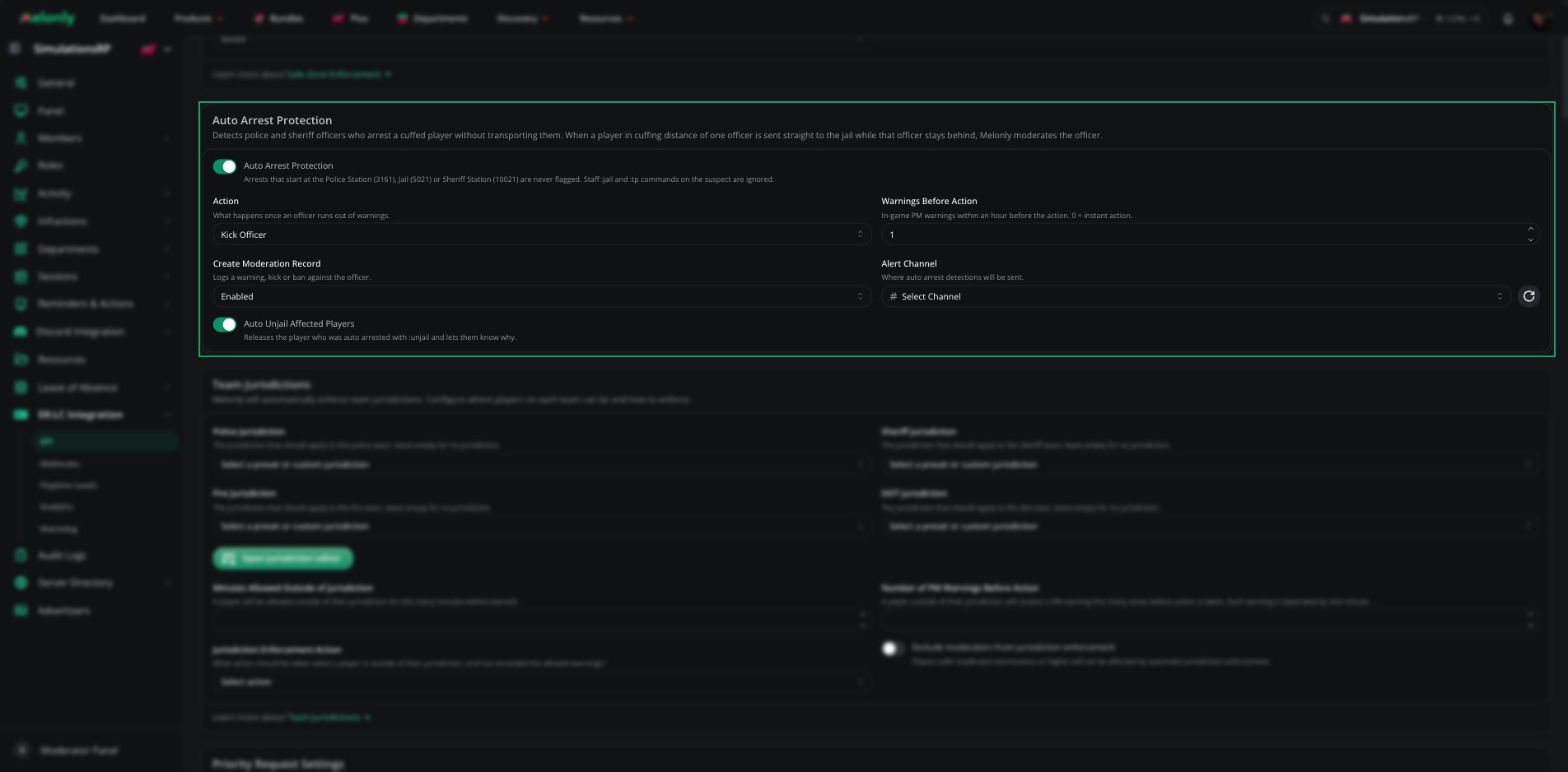
Find **Auto Arrest Protection** on the **ER:LC Integration → API** page, below **Safe Zone Enforcement**.
### Configuration Options
| Setting | Description |
| - | - |
| Auto Arrest Protection | Turns the feature on or off. Off by default. |
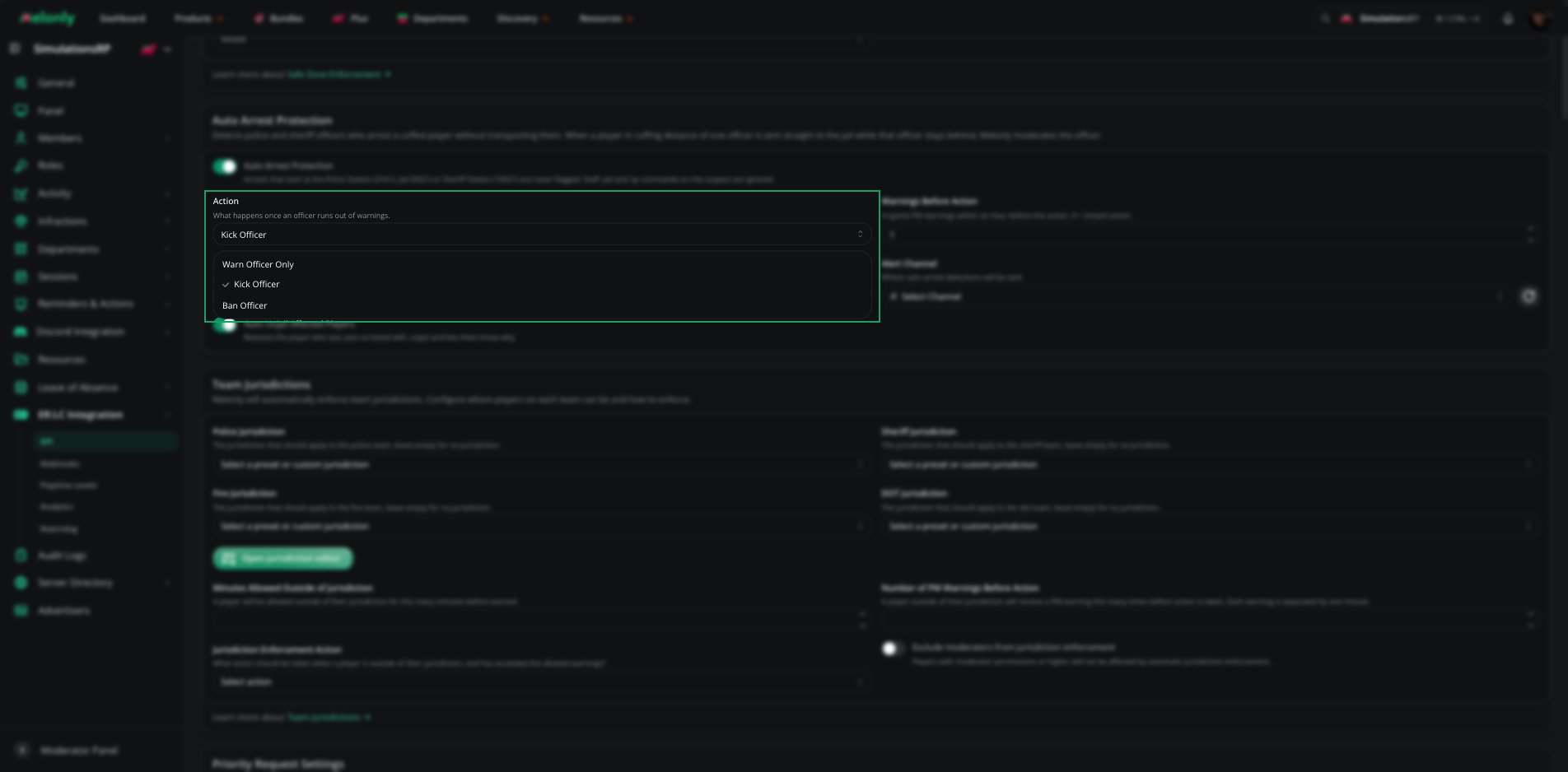
| Action | What happens once an officer runs out of warnings: Warn Officer Only, Kick Officer, Ban Officer or Team Kick Officer. Bans are made by Roblox ID. |
| Team Kick Duration | How long a team kicked officer is kept off their team, such as `30m`, `2h` or `1d`. Only shown when **Action** is **Team Kick Officer**. Defaults to 1 hour. |
| Warnings Before Action | How many in-game PM warnings an officer gets within an hour before the action is taken, from 0 to 10. 0 means instant action. Disabled when **Action** is **Warn Officer Only**. |
| Create Moderation Record | Logs a warning, kick or ban against the officer. Team kicks are logged as warnings. |
| Alert Channel | The Discord channel detections are sent to |
| Auto Unjail Affected Players | Runs `:unjail` on the suspect and PMs them that they were released |
 ***
## When is an Officer Flagged?
Melonly checks your server's player positions every few seconds. An officer is flagged when both of these happen:
A player is within cuffing range (2.5 studs) of exactly one Police or Sheriff officer.
Within 15 seconds, the player is inside the jail while the officer stays behind. The officer is still on Police or Sheriff, outside every station and at least 100 studs from the suspect.
### What is Never Flagged
* Arrests that start inside the **Police Station** (3161), the **Jail** (5021) or the **Sheriff Station** (10021)
* Suspects who were already jailed or already at the jail
* Suspects with two officers in cuffing range, since Melonly can't tell who made the arrest
* Suspects moved by a staff command, such as `:jail`, `:arrest` or `:tp`, within 10 seconds of the jump. This includes commands that target `all` or `others`.
Melonly waits about 8 seconds after a detection to check your command logs before it takes action.
***
## What Happens on Detection?
1. The officer always gets an in-game PM first.
2. If they've used up their **Warnings Before Action** within the last hour, Melonly runs the **Action**. A [team kick](/Modpanel/erlc/teamkicks) moves the officer to Civilian and keeps them off Police or Sheriff for the **Team Kick Duration**.
3. If **Create Moderation Record** is on, the warning, kick or ban is logged against the officer.
4. If an **Alert Channel** is set, Melonly sends an embed showing the officer, the suspect, the action taken, where the suspect was cuffed, where they were jailed and where the officer stayed.
5. If **Auto Unjail Affected Players** is on, the suspect is released with `:unjail` and told why.
***
## Example Use Cases
* Stop officers from auto arresting suspects instead of transporting them
* Kick, ban or team kick repeat offenders automatically
* Release wrongly jailed players without staff stepping in
* Keep a record of auto arrests in a staff channel
***
Still have questions? Join our Discord server for support from the Melonly Team.
This documentation is built and hosted on [Mintlify](https://mintlify.com), a developer documentation platform.
***
## When is an Officer Flagged?
Melonly checks your server's player positions every few seconds. An officer is flagged when both of these happen:
A player is within cuffing range (2.5 studs) of exactly one Police or Sheriff officer.
Within 15 seconds, the player is inside the jail while the officer stays behind. The officer is still on Police or Sheriff, outside every station and at least 100 studs from the suspect.
### What is Never Flagged
* Arrests that start inside the **Police Station** (3161), the **Jail** (5021) or the **Sheriff Station** (10021)
* Suspects who were already jailed or already at the jail
* Suspects with two officers in cuffing range, since Melonly can't tell who made the arrest
* Suspects moved by a staff command, such as `:jail`, `:arrest` or `:tp`, within 10 seconds of the jump. This includes commands that target `all` or `others`.
Melonly waits about 8 seconds after a detection to check your command logs before it takes action.
***
## What Happens on Detection?
1. The officer always gets an in-game PM first.
2. If they've used up their **Warnings Before Action** within the last hour, Melonly runs the **Action**. A [team kick](/Modpanel/erlc/teamkicks) moves the officer to Civilian and keeps them off Police or Sheriff for the **Team Kick Duration**.
3. If **Create Moderation Record** is on, the warning, kick or ban is logged against the officer.
4. If an **Alert Channel** is set, Melonly sends an embed showing the officer, the suspect, the action taken, where the suspect was cuffed, where they were jailed and where the officer stayed.
5. If **Auto Unjail Affected Players** is on, the suspect is released with `:unjail` and told why.
***
## Example Use Cases
* Stop officers from auto arresting suspects instead of transporting them
* Kick, ban or team kick repeat offenders automatically
* Release wrongly jailed players without staff stepping in
* Keep a record of auto arrests in a staff channel
***
Still have questions? Join our Discord server for support from the Melonly Team.
This documentation is built and hosted on [Mintlify](https://mintlify.com), a developer documentation platform.