> ## Documentation Index
> Fetch the complete documentation index at: https://docs.melonly.com/llms.txt
> Use this file to discover all available pages before exploring further.
# Raid Rollback
> Undo the commands a raider ran in your ER:LC server with a guided rollback.
***
## What is Raid Rollback?
Raid Rollback reverts the damage from a raid, such as mass bans or permissions handed out to the wrong people. Melonly runs the opposite command for each action you pick.
***
## How to Use Raid Rollback
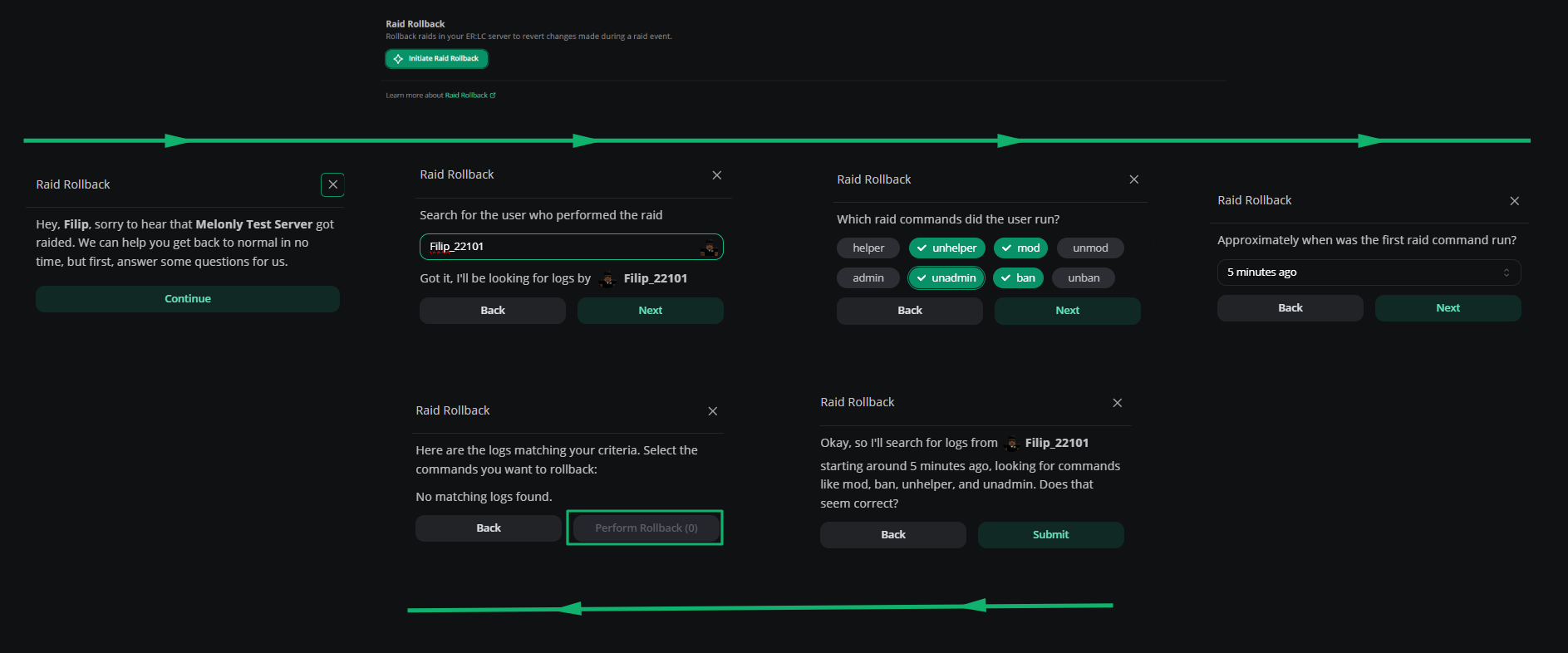
Find **Raid Rollback** on the **ER:LC Integration → API** page, below **Server Configuration**.
Click **Initiate raid rollback**, then click **Continue**.
Search for the player who ran the raid by their Roblox username.
Enter roughly when the raider ran their first command.
Choose the commands the raider used: `helper`, `unhelper`, `mod`, `unmod`, `admin`, `unadmin`, `ban` and `unban`. Then submit.
Choose the commands you want to revert, click **Perform Rollback**, then click **Submit**. Melonly runs the counter-command for each one, such as `unban` for `ban` or `unmod` for `mod`.
At least one player must be in your private server for a rollback to run. Commands run through Remote Server Management can't be rolled back. To find who started a raid, search for the command (for example `:ban all`) in the Mod Panel.
 ***
Still have questions? Join our Discord server for support from the Melonly Team.
This documentation is built and hosted on [Mintlify](https://mintlify.com), a developer documentation platform.
***
Still have questions? Join our Discord server for support from the Melonly Team.
This documentation is built and hosted on [Mintlify](https://mintlify.com), a developer documentation platform.