> ## Documentation Index
> Fetch the complete documentation index at: https://docs.melonly.com/llms.txt
> Use this file to discover all available pages before exploring further.
# Safe Zone Enforcement
> Detect kills inside safe zones in your ER:LC server and warn, kick or ban the player automatically.
***
## What is Safe Zone Enforcement?
Safe Zone Enforcement watches the safe zones you draw on the ER:LC map. If a player kills someone inside a safe zone, Melonly warns them and then kicks or bans them, based on your settings.
***
## How to Use Safe Zone Enforcement
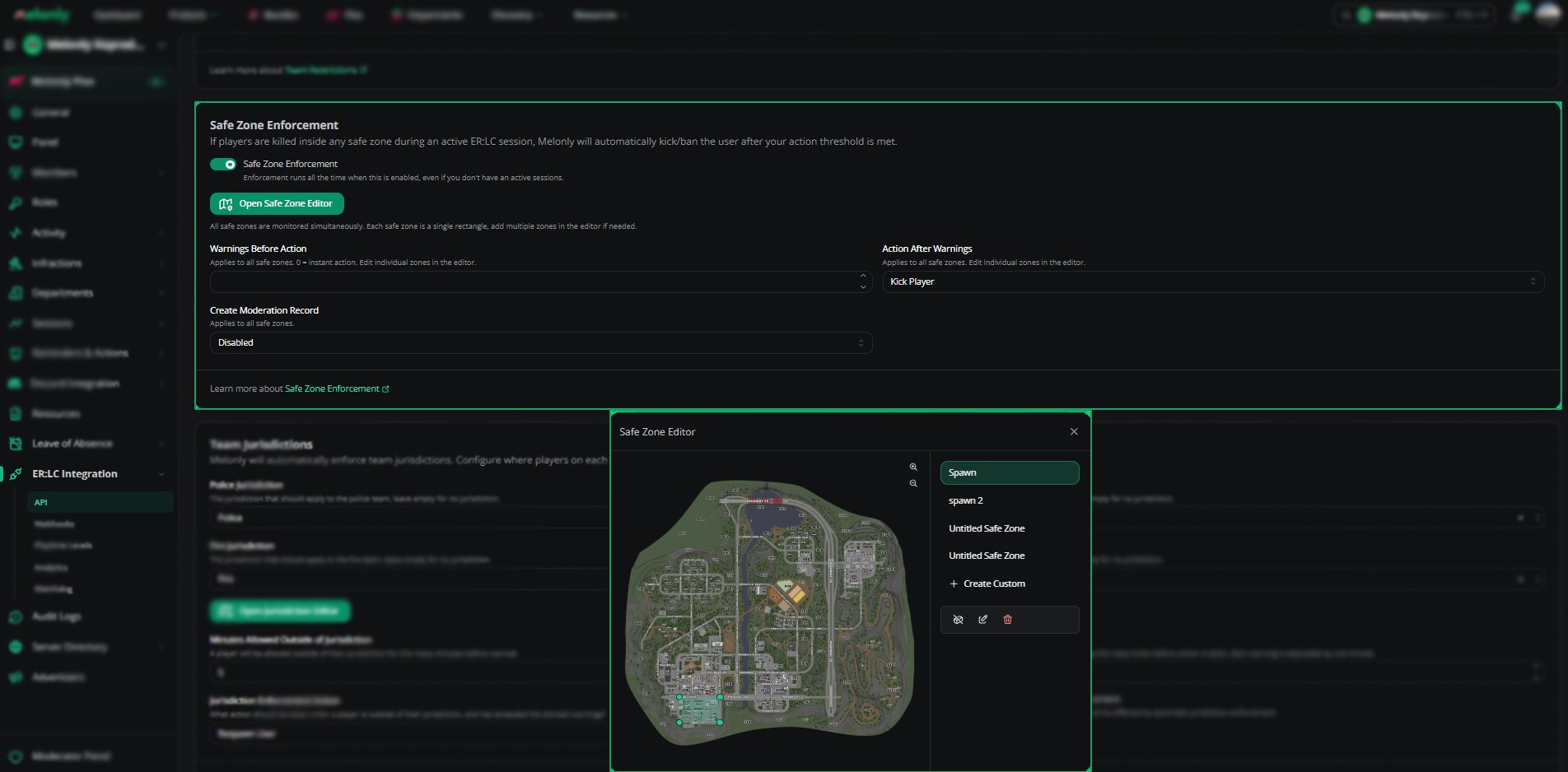
Find **Safe Zone Enforcement** on the **ER:LC Integration → API** page, below **Team Restrictions**.
### Configuration Options
| Setting | Description |
| - | - |
| Safe Zone Enforcement | Turns the feature on or off. When on, it runs all the time, even without an active session. |
| Warnings Before Action | How many warnings a player gets before action is taken. 0 means instant action. |
| Action After Warnings | Kick Player or Ban Player once the warning limit is reached |
| Create Moderation Record | Logs a moderation record for every violation |
| Open Safe Zone Editor | Opens the editor to draw and edit your safe zones |
The last three settings apply to all safe zones.
**Warnings Before Action**, **Action After Warnings** and **Create Moderation Record** stay disabled until you create at least one safe zone. If your zones have different values, they show **Mixed**.
***
## Using the Safe Zone Editor
There are no preset safe zones, so start by creating one. Each safe zone is a single rectangle, and all zones are monitored at the same time.
Click **+ Create Custom** to draw a new safe zone anywhere on the map.
Select a zone and drag its boundary points to move or resize it.
Click **Save** to apply your safe zone layout.
See [Map Editor](/Learnmore/editlocation) for more on drawing areas.
 ***
## Example Use Cases
* Stop spawn killing with instant kicks in spawn zones
* Create custom safe zones for events or training sessions
* Keep moderation records of safe zone violations
***
Still have questions? Join our Discord server for support from the Melonly Team.
This documentation is built and hosted on [Mintlify](https://mintlify.com), a developer documentation platform.
***
## Example Use Cases
* Stop spawn killing with instant kicks in spawn zones
* Create custom safe zones for events or training sessions
* Keep moderation records of safe zone violations
***
Still have questions? Join our Discord server for support from the Melonly Team.
This documentation is built and hosted on [Mintlify](https://mintlify.com), a developer documentation platform.