> ## Documentation Index
> Fetch the complete documentation index at: https://docs.melonly.com/llms.txt
> Use this file to discover all available pages before exploring further.
# Team Jurisdictions
> Set where each ER:LC team can operate and warn or act on players who leave their area.
***
## What are Team Jurisdictions?
Team Jurisdictions set where each ER:LC team is allowed to operate. If a player stays outside their team's area too long, Melonly warns them and can then respawn, wanted or kick them.
***
## How to Use Team Jurisdictions
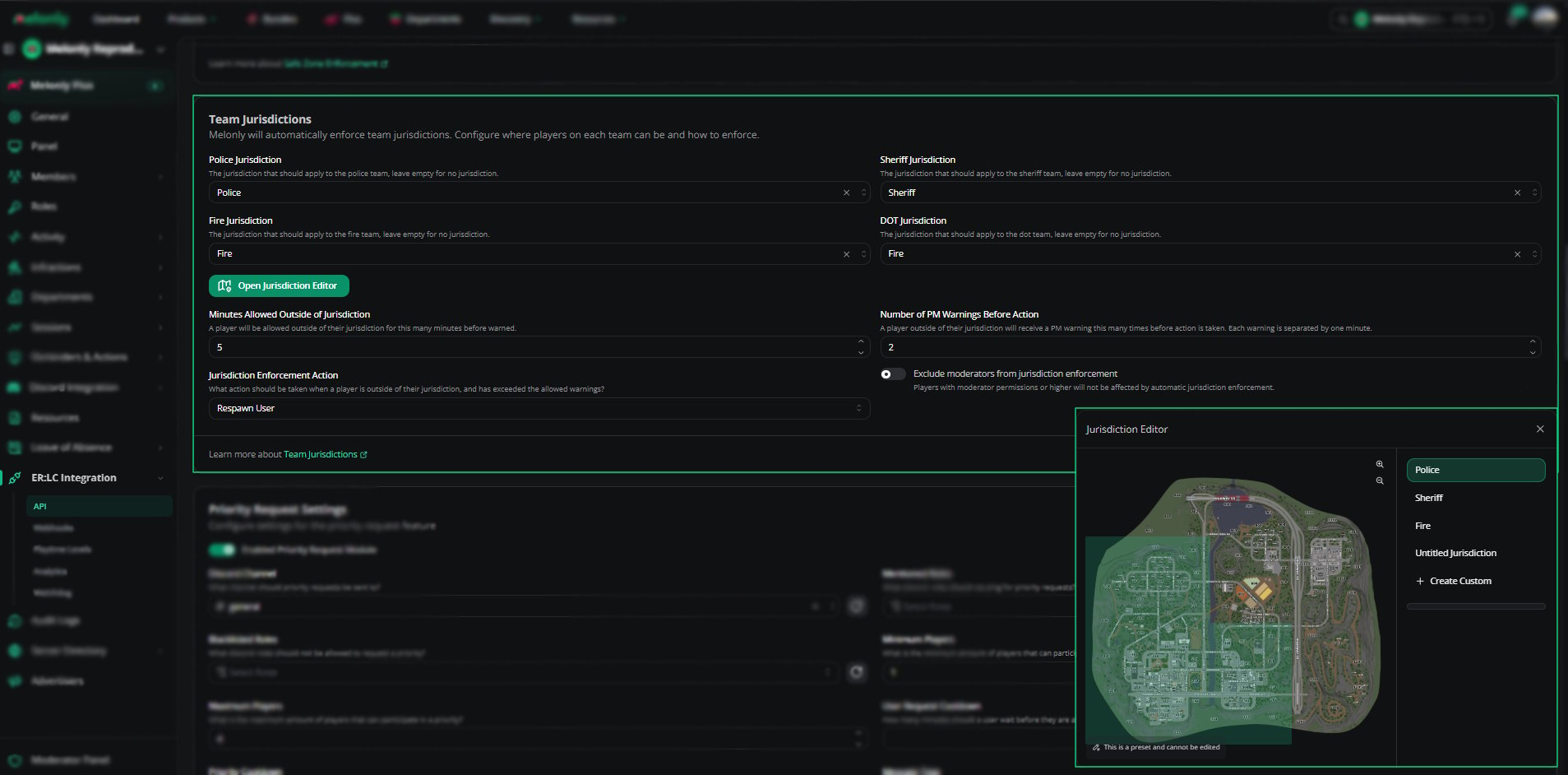
Find **Team Jurisdictions** on the **ER:LC Integration → API** page, below **Safe Zone Enforcement**.
### Configuration Options
| Setting | Description |
| - | - |
| Police, Sheriff, Fire and DOT Jurisdiction | The area each team must stay in. Leave a team blank to leave it unrestricted. |
| Open Jurisdiction Editor | Opens the editor to view preset areas or draw custom ones |
| Minutes Allowed Outside of Jurisdiction | How long a player can stay outside their area before warnings start. For example, 5 minutes. |
| Number of PM Warnings Before Action | How many PM warnings a player gets before action is taken. Warnings are sent one minute apart. |
| Jurisdiction Enforcement Action | What happens after the time and warning limits: Respawn User, Make Wanted or Kick User |
| Exclude Moderators From Jurisdiction Enforcement | Moderators and higher staff aren't affected |
***
## Using the Jurisdiction Editor
Click **Open jurisdiction editor** to view and draw jurisdictions on the ER:LC map.
Choose a preset jurisdiction, such as Police or Sheriff, or a custom one.
Preset jurisdictions can't be edited. Drag the boundary points of a custom jurisdiction to reshape it.
Click **+ Create Custom** to draw a new jurisdiction anywhere on the map.
Click **Save**. Changes apply right away, even during active sessions.
See [Map Editor](/Learnmore/editlocation) for more on drawing areas.
 ***
## Example Use Cases
* Keep Police in the city while Sheriff covers the county
* Assign Fire/EMS to a specific district
* Create custom DOT areas for roadwork or events
* Respawn players who keep leaving their assigned area
* Let moderators move freely while regular players are held to their area
***
Still have questions? Join our Discord server for support from the Melonly Team.
This documentation is built and hosted on [Mintlify](https://mintlify.com), a developer documentation platform.
***
## Example Use Cases
* Keep Police in the city while Sheriff covers the county
* Assign Fire/EMS to a specific district
* Create custom DOT areas for roadwork or events
* Respawn players who keep leaving their assigned area
* Let moderators move freely while regular players are held to their area
***
Still have questions? Join our Discord server for support from the Melonly Team.
This documentation is built and hosted on [Mintlify](https://mintlify.com), a developer documentation platform.