> ## Documentation Index
> Fetch the complete documentation index at: https://docs.melonly.com/llms.txt
> Use this file to discover all available pages before exploring further.
# Voice Channel Configurations
> Set voice channel abbreviations so players can move between channels with the in-game ;vc command.
***
## What are Voice Channel Configurations?
Voice Channel Configurations give your Discord voice channels short abbreviations. Players run the in-game `;vc` command with an abbreviation to move between channels.
Requires the [ER:LC Events Webhook](/Dashboard/erlcintegration/webhook/eventwebhook).
***
## How to Use Voice Channel Configurations
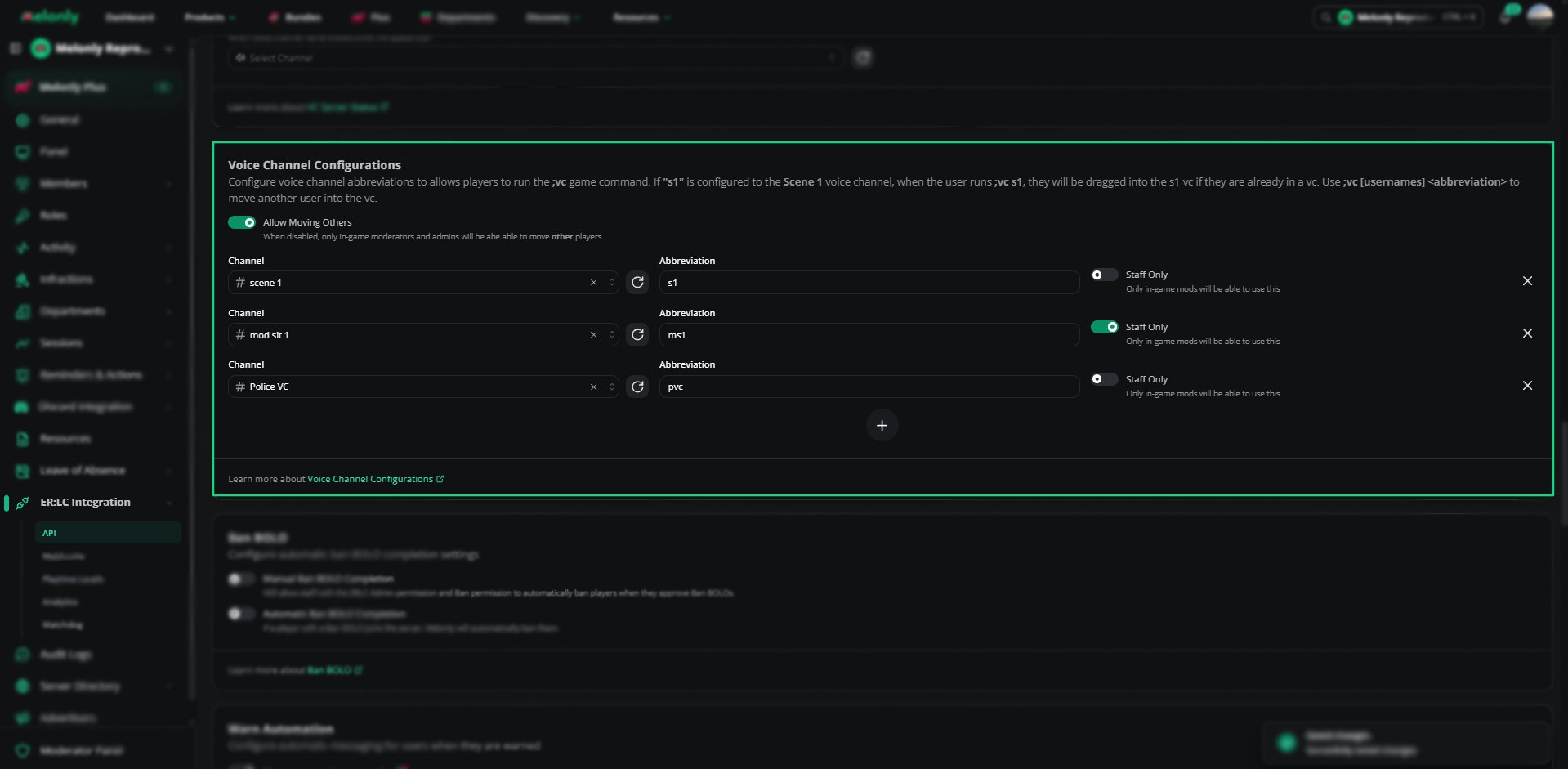
Find **Voice Channel Configurations** on the **ER:LC Integration → API** page, below **VC Server Status**.
### Configuration Options
| Setting | Description |
| - | - |
| Allow Moving Others | Lets any player move other players. When off, only in-game moderators and admins can. |
| Channel | A voice or stage channel. Each channel can only be used once. |
| Abbreviation | The short name players type, such as `s1` for Scene 1 or `ms1` for Mod Sit 1. Spaces are removed. |
| Staff Only | Only in-game moderators can use this abbreviation |
Click the plus button to add another channel. Every row needs both a channel and an abbreviation before you can save.
 ***
## Using the ;vc Command
| Command | Action |
| - | - |
| `;vc s1` | Moves you to the channel mapped to `s1`. You must already be in a voice channel. |
| `;vc [usernames] [abbreviation]` | Moves other players to the channel. Moderators and admins can always do this, and everyone can when Allow Moving Others is on. |
Staff can also use `:log vc [abbreviation]` or `:log vc [username] [abbreviation]`, which runs through the [Webhook Channel](/Dashboard/erlcintegration/webhook/webhookconfig) instead.
***
## Example Use Cases
* Let players jump into scene channels quickly
* Let moderators pull players into mod calls
* Keep certain channels staff only
***
Still have questions? Join our Discord server for support from the Melonly Team.
This documentation is built and hosted on [Mintlify](https://mintlify.com), a developer documentation platform.
***
## Using the ;vc Command
| Command | Action |
| - | - |
| `;vc s1` | Moves you to the channel mapped to `s1`. You must already be in a voice channel. |
| `;vc [usernames] [abbreviation]` | Moves other players to the channel. Moderators and admins can always do this, and everyone can when Allow Moving Others is on. |
Staff can also use `:log vc [abbreviation]` or `:log vc [username] [abbreviation]`, which runs through the [Webhook Channel](/Dashboard/erlcintegration/webhook/webhookconfig) instead.
***
## Example Use Cases
* Let players jump into scene channels quickly
* Let moderators pull players into mod calls
* Keep certain channels staff only
***
Still have questions? Join our Discord server for support from the Melonly Team.
This documentation is built and hosted on [Mintlify](https://mintlify.com), a developer documentation platform.