> ## Documentation Index
> Fetch the complete documentation index at: https://docs.melonly.com/llms.txt
> Use this file to discover all available pages before exploring further.
# Reminders
> Create automatic reminders and in-game ER:LC messages for your server.
***
## What are Reminders?
Reminders send messages for you on a schedule. Use them to post regular messages, prompt staff to do a task, or run messages and checks in your ER:LC server.
Reminders only run while at least one staff member is on shift, so nothing is sent when your server is quiet.
***
## Server Reminders
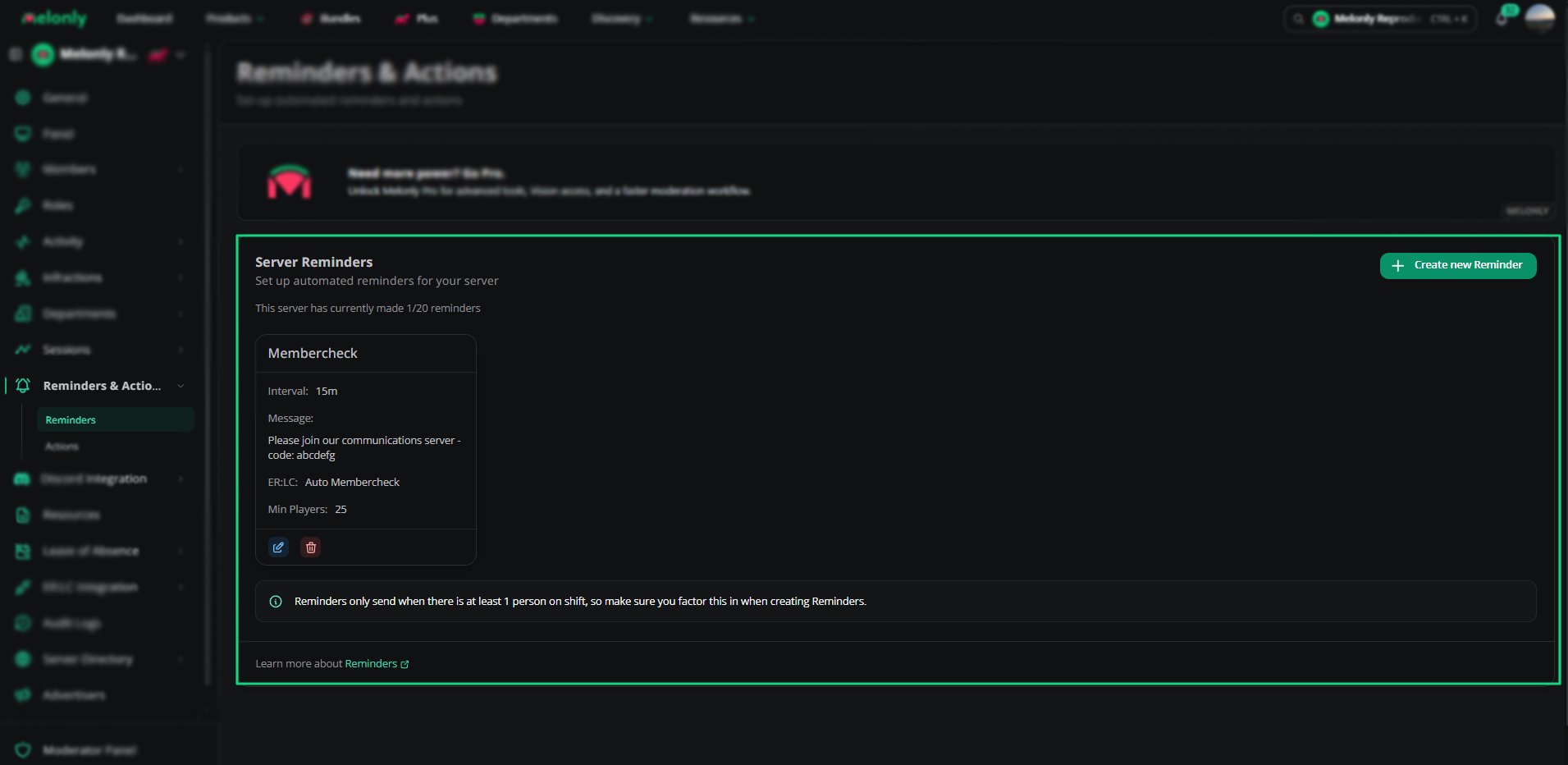 The **Reminders** page lists all your reminders. Each one shows its interval, message, linked action, ER:LC type and minimum ER:LC players, with options to edit or delete it.
You can create up to 20 reminders.
***
## Creating a Reminder
The **Reminders** page lists all your reminders. Each one shows its interval, message, linked action, ER:LC type and minimum ER:LC players, with options to edit or delete it.
You can create up to 20 reminders.
***
## Creating a Reminder
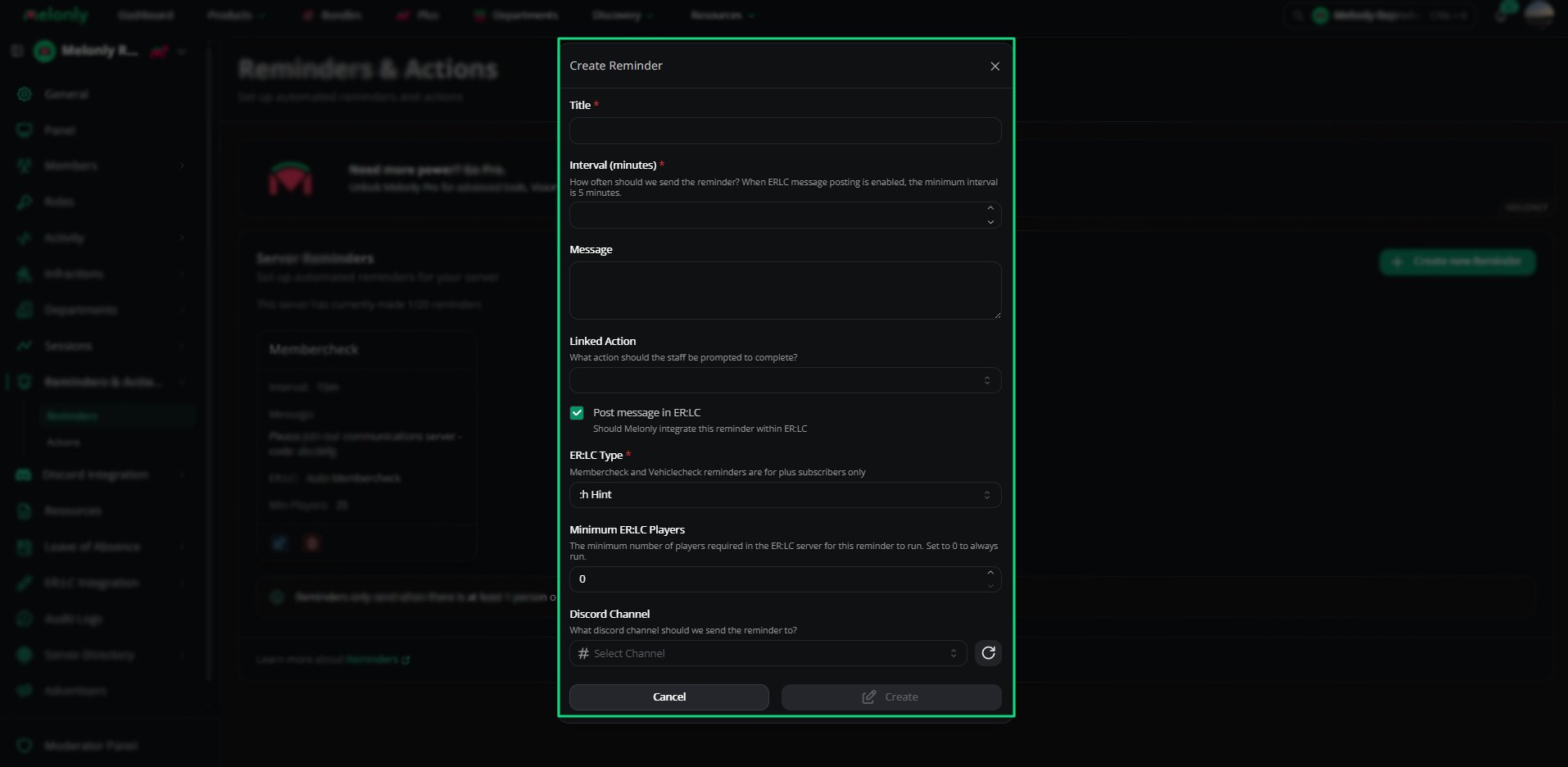 Give your reminder a clear name so staff know what it's for.
Choose how often the reminder runs. The shortest interval is 5 minutes.
This is sent to the Discord channel you pick, or in your ER:LC server.
Pick the [action](/Dashboard/reminders-actions/actions) staff should complete when the reminder runs. Leave it blank if you don't want to link one.
The reminder also runs inside your ER:LC server.
Choose the in-game command type. Membercheck and Vehiclecheck types need [Melonly Plus](https://melonly.xyz/plus).
For check types, choose how many warnings a player can get before they're kicked from your ER:LC server. Set to 0 to turn this off.
Choose how many players must be in game for the reminder to run. Set to 0 to always run.
Pick the channel the reminder is sent to. Once you pick one, you can also choose a **Mention Role** to ping.
***
## ER:LC Integration
ER:LC reminders run commands in your server automatically. The types are:
| Type | Plan |
| - | - |
| :h Hint | Free |
| :m Announcement | Free |
| :pm Membercheck | Plus |
| :pm Vehiclecheck | Plus |
| :pm & :load Membercheck | Plus |
| :pm & :load Vehiclecheck | Plus |
| :pm Livery Vehiclecheck | Plus |
| :pm & :load Livery Vehiclecheck | Plus |
***
## Reminder Requirements
* Reminders only run while at least one staff member is on shift.
* ER:LC reminders need your ER:LC server connected to Melonly. See the [ER:LC integration](/Dashboard/erlcintegration/home).
* Membercheck, Vehiclecheck and Livery Vehiclecheck reminders need Plus.
***
Still have questions? Join our Discord server for support from the Melonly Team.
This documentation is built and hosted on [Mintlify](https://mintlify.com), a developer documentation platform.
Give your reminder a clear name so staff know what it's for.
Choose how often the reminder runs. The shortest interval is 5 minutes.
This is sent to the Discord channel you pick, or in your ER:LC server.
Pick the [action](/Dashboard/reminders-actions/actions) staff should complete when the reminder runs. Leave it blank if you don't want to link one.
The reminder also runs inside your ER:LC server.
Choose the in-game command type. Membercheck and Vehiclecheck types need [Melonly Plus](https://melonly.xyz/plus).
For check types, choose how many warnings a player can get before they're kicked from your ER:LC server. Set to 0 to turn this off.
Choose how many players must be in game for the reminder to run. Set to 0 to always run.
Pick the channel the reminder is sent to. Once you pick one, you can also choose a **Mention Role** to ping.
***
## ER:LC Integration
ER:LC reminders run commands in your server automatically. The types are:
| Type | Plan |
| - | - |
| :h Hint | Free |
| :m Announcement | Free |
| :pm Membercheck | Plus |
| :pm Vehiclecheck | Plus |
| :pm & :load Membercheck | Plus |
| :pm & :load Vehiclecheck | Plus |
| :pm Livery Vehiclecheck | Plus |
| :pm & :load Livery Vehiclecheck | Plus |
***
## Reminder Requirements
* Reminders only run while at least one staff member is on shift.
* ER:LC reminders need your ER:LC server connected to Melonly. See the [ER:LC integration](/Dashboard/erlcintegration/home).
* Membercheck, Vehiclecheck and Livery Vehiclecheck reminders need Plus.
***
Still have questions? Join our Discord server for support from the Melonly Team.
This documentation is built and hosted on [Mintlify](https://mintlify.com), a developer documentation platform.