> ## Documentation Index
> Fetch the complete documentation index at: https://docs.melonly.com/llms.txt
> Use this file to discover all available pages before exploring further.
# Applications
> Build and manage applications, ban appeals and forms for your server.
***
Applications are forms and questionnaires built for ER:LC communities.\
They support automatic role assignment, staging, internal comments and more.
***
## Why Not Google Forms
Melonly Applications are built for ER:LC.\
Discord and Roblox info is collected automatically, roles are assigned on accept or deny and you get features like required roles, copy/paste detection and quizzes.
***
## Standout Features
Automatic Discord and Roblox info collection.
A built-in ban appeal type that automatically unbans members when their appeal is approved.
Highlights any text pasted into a response.
Tracks how often an applicant tabs away while filling out the form.
Flags responses that look AI-generated. See [AI Detection](#ai-detection).
***
## Create an Application
Open your server in the [dashboard](https://melonly.xyz/dashboard).
Go to the **Resources** page.
Click **New Form**, name it, choose **Application** or **ER:LC Ban Appeal**, then customize the form.
***
## Response Types
| Type | Description |
| - | - |
| Short Answer | Brief, single-line responses |
| Paragraph Answer | Long-form responses |
| Roblox | Roblox username field |
| Type | Description |
| - | - |
| Multiple Choice | Pick one option |
| Checkbox | Pick several options |
| Dropdown | Pick one option from a compact menu |
| Type | Description |
| - | - |
| Number | Numeric only |
| Date | Calendar picker |
| Time | Time picker |
| Linear Scale | Rating scale, such as 1 to 5 |
| Shift Start | Date and time picker for a shift start |
| Shift End | Date and time picker for a shift end |
| Type | Description |
| - | - |
| Moderation Select | Pick one of the applicant's moderation logs |
| File | Upload images or videos |
***
## Application Responses
The **Responses** tab on each application splits into pending, staging, approved and denied. Use search to find a specific response.
### Response Presets
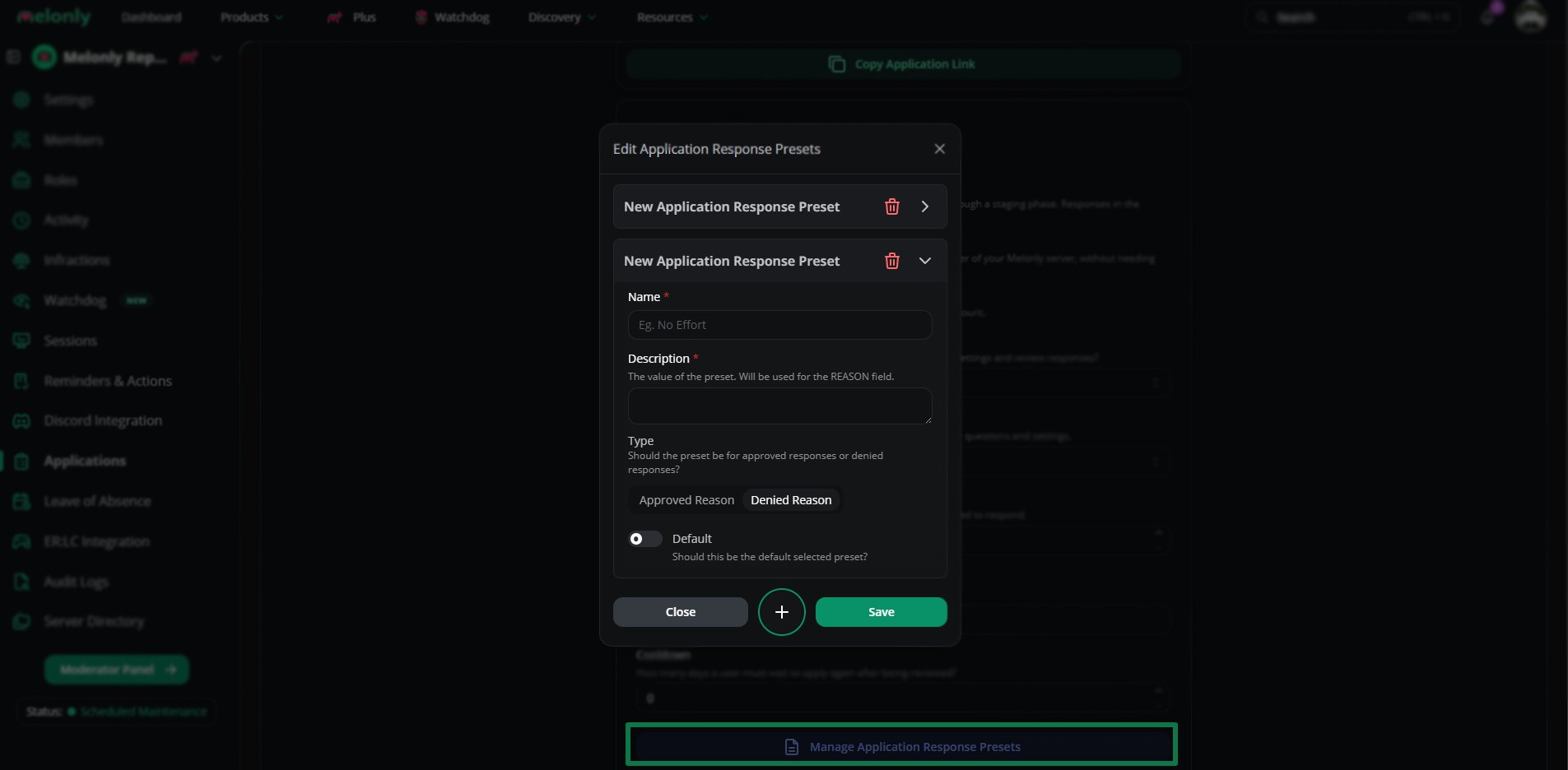
Save preset accept and deny reasons for faster reviews.
Open the application's settings, click **Manage Application Response Presets** and fill in the details.
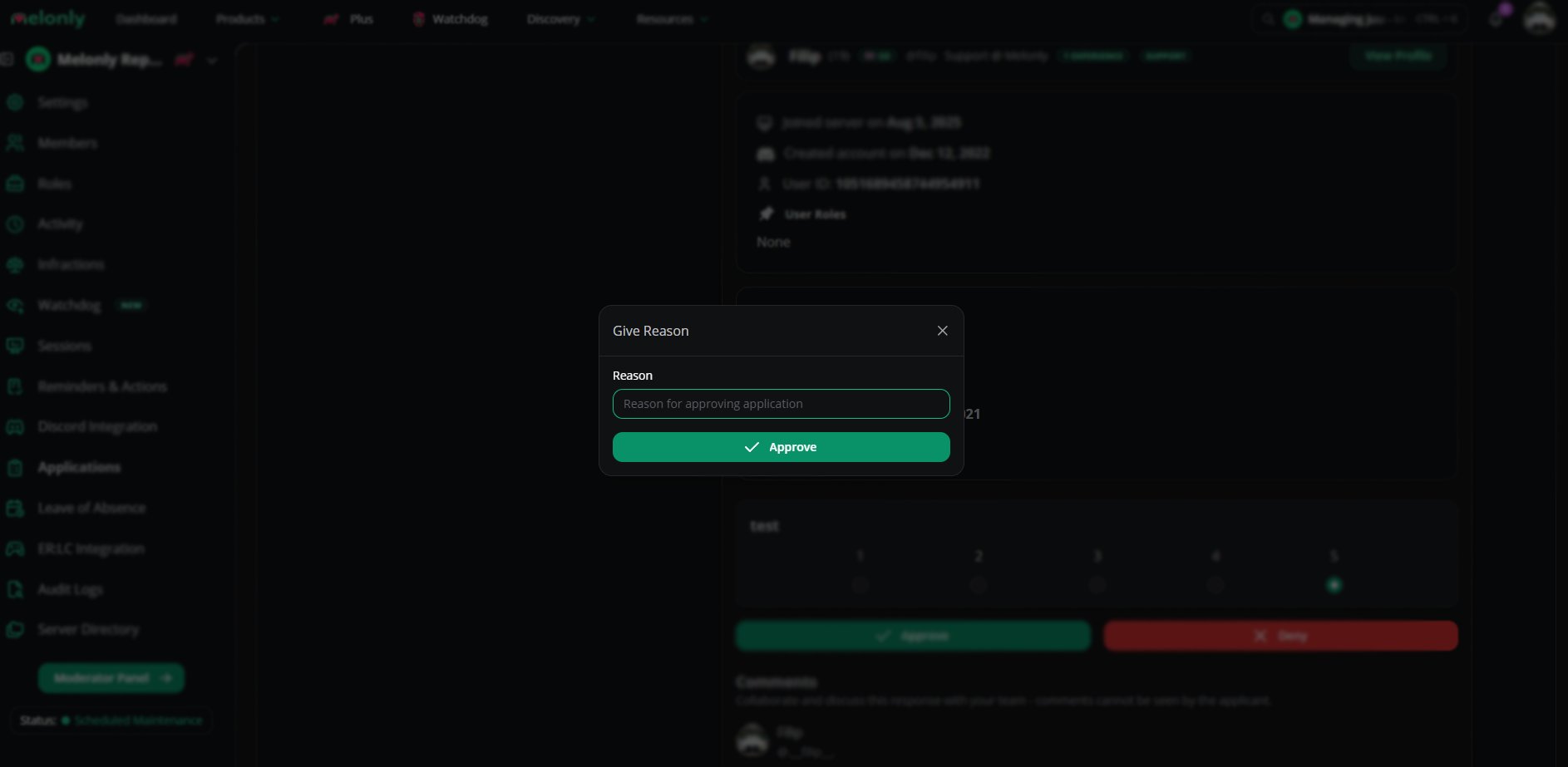
 Type the preset name into the **Reason** field when you accept or deny. The full message fills in when you submit.
 ***
## AI Detection
AI tools read application responses and flag content that looks AI-generated.
***
## Application Settings
### General
| Setting | Description |
| - | - |
| Accepting Responses | Lets users submit responses |
| Stage Responses | Sends accepts and denials through staging before they are published |
| Join Melonly Server on Approval | Automatically adds approved applicants to your server |
***
### Editor & Reviewer
| Permission | Description |
| - | - |
| Editor | Edit questions and content, but not advanced settings |
| Reviewer | Review responses, send them to staging and publish them |
***
### Additional
| Setting | Description |
| - | - |
| Max Logs | Blocks users with too many moderation logs from applying |
| Requires Roblox Group | Roblox group applicants must belong to |
| Cooldown | Time before a user can apply again |
***
### Quiz
| Setting | Description |
| - | - |
| Release Scores | When scores are released: immediately or after review |
| Default Question Point Value | Default points per question |
| Release Type | Description |
| - | - |
| Immediately | Scores show as soon as the quiz is submitted |
| After Review | Scores release once the response is approved or denied |
Read more about [the Quiz feature](/Learnmore/Quiz).
***
### Discord Integration
| Setting | Description |
| - | - |
| Require Discord Member | Applicants must be in your linked Discord server |
| Minimum Discord Member Age | Minimum time in the Discord server before applying |
| Add Roles on Approval | Roles granted on accept |
| Remove Roles on Approval | Roles removed on accept |
| Add Roles on Denial | Roles granted on deny |
| Remove Roles on Denial | Roles removed on deny |
| Required Roles | Roles applicants must already have |
| Blacklisted Roles | Roles that block applying |
| Event Channel | Channel notified on new responses |
| Result Channel | Channel where published results are posted |
***
### Advanced
Deleting all responses or the application itself is permanent.
| Action | Description |
| - | - |
| Duplicate Application | Copies questions, sections and settings to a new application (responses are not copied) |
| Delete All Responses | Permanently deletes every response |
| Delete Application | Permanently deletes the application and all its data |
***
Still have questions? Join our Discord server for support from the Melonly Team.
This documentation is built and hosted on [Mintlify](https://mintlify.com), a developer documentation platform.
***
## AI Detection
AI tools read application responses and flag content that looks AI-generated.
***
## Application Settings
### General
| Setting | Description |
| - | - |
| Accepting Responses | Lets users submit responses |
| Stage Responses | Sends accepts and denials through staging before they are published |
| Join Melonly Server on Approval | Automatically adds approved applicants to your server |
***
### Editor & Reviewer
| Permission | Description |
| - | - |
| Editor | Edit questions and content, but not advanced settings |
| Reviewer | Review responses, send them to staging and publish them |
***
### Additional
| Setting | Description |
| - | - |
| Max Logs | Blocks users with too many moderation logs from applying |
| Requires Roblox Group | Roblox group applicants must belong to |
| Cooldown | Time before a user can apply again |
***
### Quiz
| Setting | Description |
| - | - |
| Release Scores | When scores are released: immediately or after review |
| Default Question Point Value | Default points per question |
| Release Type | Description |
| - | - |
| Immediately | Scores show as soon as the quiz is submitted |
| After Review | Scores release once the response is approved or denied |
Read more about [the Quiz feature](/Learnmore/Quiz).
***
### Discord Integration
| Setting | Description |
| - | - |
| Require Discord Member | Applicants must be in your linked Discord server |
| Minimum Discord Member Age | Minimum time in the Discord server before applying |
| Add Roles on Approval | Roles granted on accept |
| Remove Roles on Approval | Roles removed on accept |
| Add Roles on Denial | Roles granted on deny |
| Remove Roles on Denial | Roles removed on deny |
| Required Roles | Roles applicants must already have |
| Blacklisted Roles | Roles that block applying |
| Event Channel | Channel notified on new responses |
| Result Channel | Channel where published results are posted |
***
### Advanced
Deleting all responses or the application itself is permanent.
| Action | Description |
| - | - |
| Duplicate Application | Copies questions, sections and settings to a new application (responses are not copied) |
| Delete All Responses | Permanently deletes every response |
| Delete Application | Permanently deletes the application and all its data |
***
Still have questions? Join our Discord server for support from the Melonly Team.
This documentation is built and hosted on [Mintlify](https://mintlify.com), a developer documentation platform.