> ## Documentation Index
> Fetch the complete documentation index at: https://docs.melonly.com/llms.txt
> Use this file to discover all available pages before exploring further.
# Triggers
> Learn how triggers start workflows and see every available trigger.
***
Triggers are events that start a workflow. When a trigger fires, the workflow runs and passes the trigger's data to the next block.\
Triggers can come from Discord, ER:LC, Melonly or utility events such as timers.
***
## How Triggers Work
A trigger fires when its event happens, for example:
* A player joins your ER:LC server
* A Discord slash command is used
* A scheduled time is reached
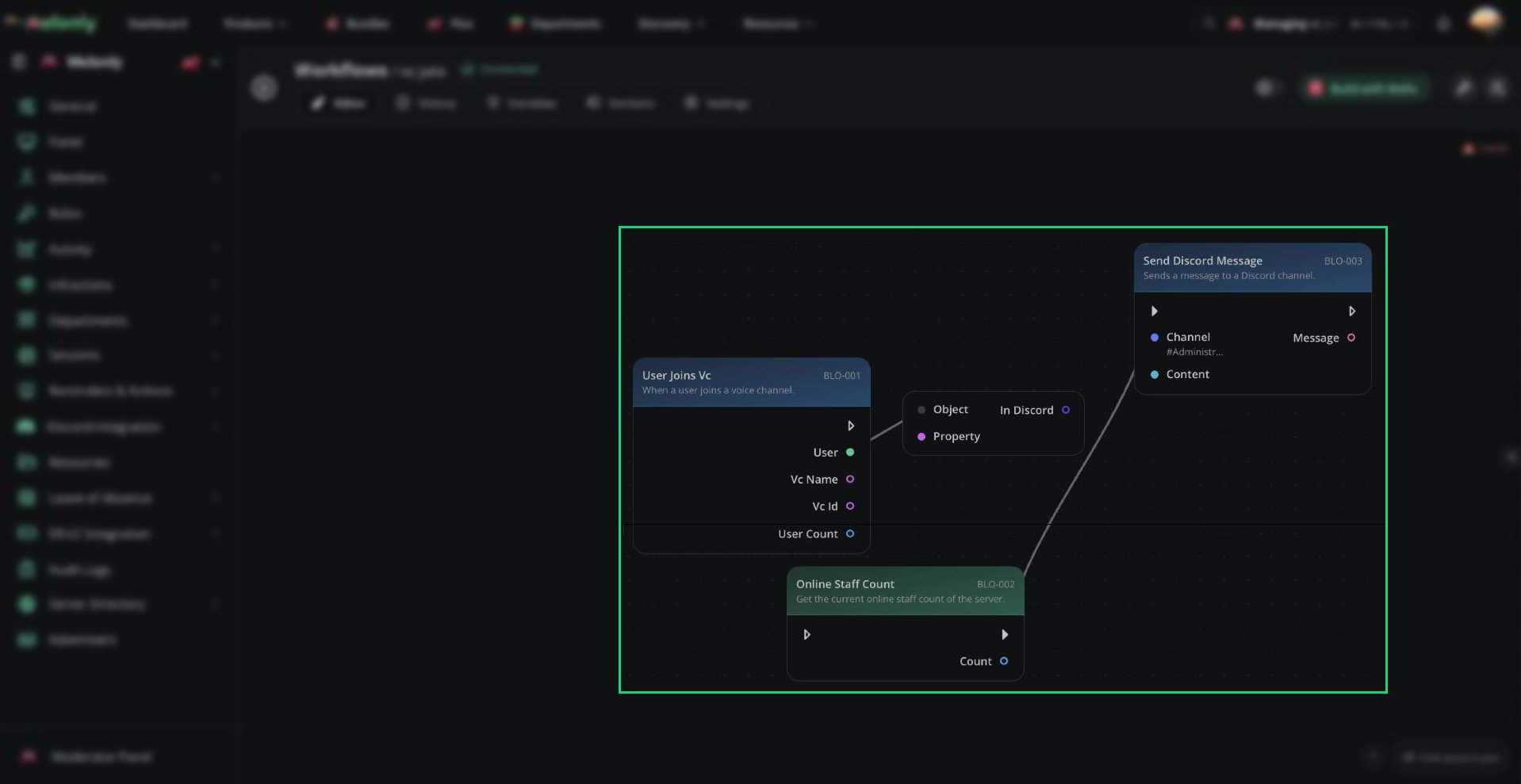 ***
## Triggers
Each trigger starts a workflow when its event happens and provides its own data to the rest of the workflow.
| Trigger | Description |
| - | - |
| Custom Slash Command | Runs when a custom slash command is used in your Discord server. |
| Joined Discord Server | Runs when a user joins the Discord server. |
| Left Discord Server | Runs when a user leaves the Discord server. |
| Discord Role Given | Runs when a Discord role is given to a user. |
| Discord Role Removed | Runs when a Discord role is removed from a user. |
| Kicked From Discord | Runs when a user is kicked from the Discord server. |
| Banned From Discord | Runs when a user is banned from the Discord server. |
| Unbanned From Discord | Runs when a user is unbanned from the Discord server. |
| Discord Invite Created | Runs when an invite is created in the Discord server. |
| Discord Invite Deleted | Runs when an invite is deleted in the Discord server. |
See [Discord Triggers](/Dashboard/resources/workflows/triggers/discordtriggers) for the data each trigger provides and how to set it up.
| Trigger | Description |
| - | - |
| Custom ER:LC Command | Runs when a custom ER:LC command is used in your in-game server. |
| Joined ER:LC Server | Runs when a player joins the in-game ER:LC server. |
| Left ER:LC Server | Runs when a player leaves the in-game ER:LC server. |
| Player Count Reaches | Runs when the player count reaches a specific number. |
| Player Count Rises Above | Runs when the player count rises above a specific number. |
| Player Count Drops Below | Runs when the player count drops below a specific number. |
| Team Player Count Reaches | Runs when a team's player count reaches a specific number. |
| Player Killed | Runs when a player is killed in-game. |
| Emergency Created | Runs when an emergency call is created in-game. |
| Vehicle Used | Runs when a player uses a vehicle in-game. |
| Livery Used | Runs when a player uses a specific livery in-game. |
| Plate Used | Runs when a player uses a specific plate in-game. |
| Player Joins Team | Runs when a player joins a team in-game. |
| Callsign Used | Runs when a player uses a callsign in-game. |
| Modcall Answered | Runs when a modcall is answered in-game. |
| Unanswered Modcalls Reaches | Runs when the number of unanswered modcalls reaches a set threshold. |
| Command Used | Runs when an in-game ER:LC command is used. |
| Staff Kicks All | Runs when a staff member uses the kick-all command in-game. |
| Staff Bans All | Runs when a staff member uses the ban-all command in-game. |
| Player Kicked | Runs when a player is kicked from the server. |
| Player Banned | Runs when a player is banned from the server. |
| Troll Username Detected | Runs when a player with a troll username joins the game. |
See [ER:LC Triggers](/Dashboard/resources/workflows/triggers/erlctriggers) for the data each trigger provides and how to set it up.
| Trigger | Description |
| - | - |
| Log Created | Runs when a punishment log is created. |
| Log Edited | Runs when a punishment log is edited. |
| Log Deleted | Runs when a punishment log is deleted. |
| Infraction Created | Runs when an infraction is created. |
| Infraction Edited | Runs when an infraction is edited. |
| Infraction Voided | Runs when an infraction is voided. |
| Infraction Expired | Runs when an infraction expires. |
| Melonly Role Added | Runs when a Melonly role is added to a user. |
| Melonly Role Removed | Runs when a Melonly role is removed from a user. |
| Session Started | Runs when a session is started. |
| Session Vote Started | Runs when a session vote is started. |
| Session Boosted | Runs when a session boost message is posted. |
| Session Ended | Runs when a session is ended. |
| Shift Started | Runs when a shift is started. |
| Shift Ended | Runs when a shift is ended. |
| Break Started | Runs when a shift break is started. |
| Break Ended | Runs when a shift break is ended. |
| Activity Wave Started | Runs when an activity wave is started. |
| Activity Wave Ended | Runs when an activity wave is ended. |
See [Melonly Triggers](/Dashboard/resources/workflows/triggers/melonlytriggers) for the data each trigger provides and how to set it up.
| Trigger | Description |
| - | - |
| Timer | Runs repeatedly every configured number of minutes. |
| Webhook | Runs when the workflow's webhook is called by an external application. |
See [Utility Triggers](/Dashboard/resources/workflows/triggers/utilitytriggers) for the data each trigger provides and how to set it up.
***
## Triggers That Require Extra Configuration
Some triggers need extra setup before you can continue to the editor:
* Custom Slash Command
* Custom ER:LC Command
* Timer
* Webhook
***
Still have questions? Join our Discord server for support from the Melonly Team.
This documentation is built and hosted on [Mintlify](https://mintlify.com), a developer documentation platform.
***
## Triggers
Each trigger starts a workflow when its event happens and provides its own data to the rest of the workflow.
| Trigger | Description |
| - | - |
| Custom Slash Command | Runs when a custom slash command is used in your Discord server. |
| Joined Discord Server | Runs when a user joins the Discord server. |
| Left Discord Server | Runs when a user leaves the Discord server. |
| Discord Role Given | Runs when a Discord role is given to a user. |
| Discord Role Removed | Runs when a Discord role is removed from a user. |
| Kicked From Discord | Runs when a user is kicked from the Discord server. |
| Banned From Discord | Runs when a user is banned from the Discord server. |
| Unbanned From Discord | Runs when a user is unbanned from the Discord server. |
| Discord Invite Created | Runs when an invite is created in the Discord server. |
| Discord Invite Deleted | Runs when an invite is deleted in the Discord server. |
See [Discord Triggers](/Dashboard/resources/workflows/triggers/discordtriggers) for the data each trigger provides and how to set it up.
| Trigger | Description |
| - | - |
| Custom ER:LC Command | Runs when a custom ER:LC command is used in your in-game server. |
| Joined ER:LC Server | Runs when a player joins the in-game ER:LC server. |
| Left ER:LC Server | Runs when a player leaves the in-game ER:LC server. |
| Player Count Reaches | Runs when the player count reaches a specific number. |
| Player Count Rises Above | Runs when the player count rises above a specific number. |
| Player Count Drops Below | Runs when the player count drops below a specific number. |
| Team Player Count Reaches | Runs when a team's player count reaches a specific number. |
| Player Killed | Runs when a player is killed in-game. |
| Emergency Created | Runs when an emergency call is created in-game. |
| Vehicle Used | Runs when a player uses a vehicle in-game. |
| Livery Used | Runs when a player uses a specific livery in-game. |
| Plate Used | Runs when a player uses a specific plate in-game. |
| Player Joins Team | Runs when a player joins a team in-game. |
| Callsign Used | Runs when a player uses a callsign in-game. |
| Modcall Answered | Runs when a modcall is answered in-game. |
| Unanswered Modcalls Reaches | Runs when the number of unanswered modcalls reaches a set threshold. |
| Command Used | Runs when an in-game ER:LC command is used. |
| Staff Kicks All | Runs when a staff member uses the kick-all command in-game. |
| Staff Bans All | Runs when a staff member uses the ban-all command in-game. |
| Player Kicked | Runs when a player is kicked from the server. |
| Player Banned | Runs when a player is banned from the server. |
| Troll Username Detected | Runs when a player with a troll username joins the game. |
See [ER:LC Triggers](/Dashboard/resources/workflows/triggers/erlctriggers) for the data each trigger provides and how to set it up.
| Trigger | Description |
| - | - |
| Log Created | Runs when a punishment log is created. |
| Log Edited | Runs when a punishment log is edited. |
| Log Deleted | Runs when a punishment log is deleted. |
| Infraction Created | Runs when an infraction is created. |
| Infraction Edited | Runs when an infraction is edited. |
| Infraction Voided | Runs when an infraction is voided. |
| Infraction Expired | Runs when an infraction expires. |
| Melonly Role Added | Runs when a Melonly role is added to a user. |
| Melonly Role Removed | Runs when a Melonly role is removed from a user. |
| Session Started | Runs when a session is started. |
| Session Vote Started | Runs when a session vote is started. |
| Session Boosted | Runs when a session boost message is posted. |
| Session Ended | Runs when a session is ended. |
| Shift Started | Runs when a shift is started. |
| Shift Ended | Runs when a shift is ended. |
| Break Started | Runs when a shift break is started. |
| Break Ended | Runs when a shift break is ended. |
| Activity Wave Started | Runs when an activity wave is started. |
| Activity Wave Ended | Runs when an activity wave is ended. |
See [Melonly Triggers](/Dashboard/resources/workflows/triggers/melonlytriggers) for the data each trigger provides and how to set it up.
| Trigger | Description |
| - | - |
| Timer | Runs repeatedly every configured number of minutes. |
| Webhook | Runs when the workflow's webhook is called by an external application. |
See [Utility Triggers](/Dashboard/resources/workflows/triggers/utilitytriggers) for the data each trigger provides and how to set it up.
***
## Triggers That Require Extra Configuration
Some triggers need extra setup before you can continue to the editor:
* Custom Slash Command
* Custom ER:LC Command
* Timer
* Webhook
***
Still have questions? Join our Discord server for support from the Melonly Team.
This documentation is built and hosted on [Mintlify](https://mintlify.com), a developer documentation platform.