> ## Documentation Index
> Fetch the complete documentation index at: https://docs.melonly.com/llms.txt
> Use this file to discover all available pages before exploring further.
# Melonly Triggers
> Learn what starts each Melonly trigger and what data it provides.
***
Melonly Triggers start workflows when something happens inside Melonly.\
They can react to moderation logs, infractions, Melonly roles, sessions, shifts, breaks and activity waves.
 ***
## Blocks
## Logs
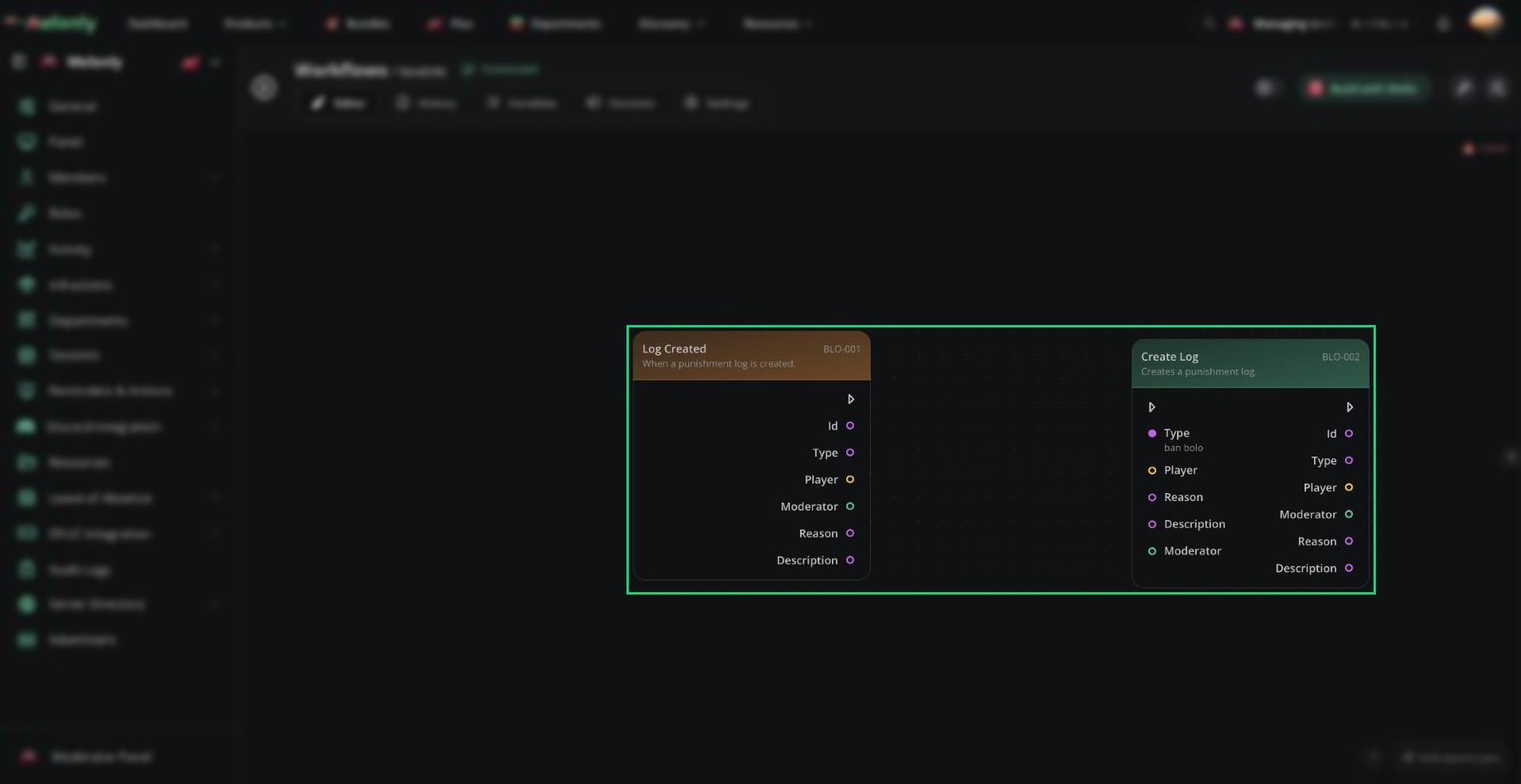
Starts the workflow when a punishment log is created.
**Output**
* **Id**: The log ID as a string.
* **Type**: The log type as a string.
* **Player**: The Roblox player the log was created for.
* **Moderator**: The user recorded as the moderator, when available. This is not guaranteed for system-created logs.
* **Reason**: The log reason as a string. This may be empty.
* **Description**: The log description as a string. This may be empty.
**Use it when**
* A workflow should run whenever a new punishment log is created.
* You want to forward or process newly created logs elsewhere.
Starts the workflow when a punishment log is edited.
**Output**
* **Id**: The edited log ID as a string.
* **Type**: The current log type as a string.
* **Player**: The Roblox player the log belongs to.
* **Moderator**: The user recorded as the moderator, when available. This is not guaranteed for system-created logs.
* **Reason**: The current log reason as a string. This may be empty.
* **Description**: The current log description as a string. This may be empty.
**Use it when**
* A workflow should react when an existing punishment log changes.
Starts the workflow when a punishment log is deleted.
The trigger preserves the deleted log's original output values.
**Output**
* **Id**: The deleted log ID as a string.
* **Type**: The log type as a string.
* **Player**: The Roblox player the log belonged to.
* **Moderator**: The user recorded as the moderator, when available. This is not guaranteed for system-created logs.
* **Reason**: The log reason as a string. This may be empty.
* **Description**: The log description as a string. This may be empty.
**Use it when**
* A workflow should record or react to a punishment log being deleted.
## Infractions
Starts the workflow when an infraction is created.
**Output**
* **Id**: The infraction ID as a string.
* **Points**: The number of points issued as a number.
* **Reason**: The infraction reason as a string.
* **Member**: The user who received the infraction.
* **Moderator**: The user who issued it, when available. This is not guaranteed for system-created infractions.
* **Term**: A boolean showing whether the infraction is a termination.
**Use it when**
* A workflow should run when a new staff infraction is issued.
Starts the workflow when an infraction is edited.
**Output**
* **Id**: The infraction ID as a string.
* **Points**: The current number of points as a number.
* **Reason**: The current infraction reason as a string.
* **Member**: The user who received the infraction.
* **Moderator**: The user connected to the infraction, when available. This is not guaranteed for system-created infractions.
* **Term**: The current boolean showing whether the infraction is a termination.
**Use it when**
* A workflow should react when an existing infraction changes.
Starts the workflow when an infraction is voided.
**Output**
* **Id**: The infraction ID as a string.
* **Points**: The number of points on the infraction as a number.
* **Reason**: The original infraction reason as a string.
* **Member**: The user who received the infraction.
* **Moderator**: The user connected to the infraction, when available. This is not guaranteed for system-created infractions.
* **Void Reason**: The reason the infraction was voided as a string. This may be empty.
* **Term**: A boolean showing whether the infraction is a termination.
**Use it when**
* A workflow should record or announce that an infraction was voided.
Starts the workflow when an infraction expires.
Permanent infractions do not expire and therefore do not trigger this event.
**Output**
* **Id**: The infraction ID as a string.
* **Points**: The number of points on the infraction as a number.
* **Reason**: The infraction reason as a string.
* **Member**: The user who received the infraction.
* **Moderator**: The user connected to the infraction, when available. This is not guaranteed for system-created infractions.
* **Term**: A boolean showing whether the infraction is a termination.
**Use it when**
* A workflow should run when an infraction reaches the end of its term.
## Roles
Starts the workflow when a Melonly role is added to a user.
This trigger runs regardless of whether the role change was made manually, by a workflow or by another Melonly system.
**Output**
* **User**: The user affected by the role change.
* **Role**: The Melonly role name as a string.
* **Moderator**: The user that made the change, when available. This is not guaranteed for automated changes.
**Use it when**
* A workflow should run after a Melonly role is added.
* You want to send a message or trigger another action after the role change.
Starts the workflow when a Melonly role is removed from a user.
This trigger runs regardless of whether the role change was made manually, by a workflow or by another Melonly system.
**Output**
* **User**: The user affected by the role change.
* **Role**: The Melonly role name as a string.
* **Moderator**: The user that made the change, when available. This is not guaranteed for automated changes.
**Use it when**
* A workflow should run after a Melonly role is removed.
* You want to send a message or trigger another action after the role change.
## Sessions
Starts the workflow when a session is started.
This trigger runs regardless of whether the session was started manually or by a workflow.
**Output**
* **Id**: The session ID as a string.
* **Playercount**: The ER:LC player count at the moment the session started as a number.
* **Moderator**: The user who started the session, when available. This is not guaranteed for automated events.
* **Aop**: The session area of patrol as a string.
**Use it when**
* A workflow should announce, log or react to a session starting.
Starts the workflow when a session vote is started.
**Output**
* **Id**: The session vote ID as a string.
* **Votes Required**: The number of votes required as a number.
* **Playercount**: The current ER:LC player count at the moment the vote started as a number.
* **Moderator**: The user who started the vote, when available. This is not guaranteed for automated events.
* **Aop**: The session area of patrol as a string.
**Use it when**
* A workflow should announce or react to a session vote starting.
Starts the workflow when a session boost is triggered in Melonly.
**Output**
* **Id**: The session ID as a string.
* **Playercount**: The current ER:LC player count at the moment the session was boosted as a number.
* **Moderator**: The user who boosted the session, when available. This is not guaranteed for automated events.
* **Aop**: The session area of patrol as a string.
**Use it when**
* A workflow should log or react to a session boost.
Starts the workflow when a session ends.
This trigger runs regardless of whether the session was ended manually, through shutdown or by a workflow.
**Output**
* **Id**: The session ID as a string.
* **Duration**: The completed session duration in whole seconds.
* **Moderator**: The user who ended the session, when available. This is not guaranteed for automated events.
* **Aop**: The session area of patrol as a string.
**Use it when**
* A workflow should announce, log or process a completed session.
## Shifts & Breaks
Starts the workflow when a shift is started.
**Output**
* **Moderator**: The staff member whose shift started.
* **Shift Type**: The type of shift that was started as a string.
* **Wave**: The matching activity wave number as a number.
**Use it when**
* A workflow should run when a staff member begins a shift.
Starts the workflow when a shift ends.
**Output**
* **Moderator**: The staff member whose shift ended.
* **Shift Type**: The type of shift that ended as a string.
* **Wave**: The matching activity wave number as a number.
**Use it when**
* A workflow should log or process a completed shift.
Starts the workflow when a shift break is started.
**Output**
* **Moderator**: The staff member whose break started.
* **Shift Type**: The type of shift connected to the break as a string.
* **Wave**: The matching activity wave number as a number.
**Use it when**
* A workflow should run when a staff member begins a break.
Starts the workflow when a shift break ends.
**Output**
* **Moderator**: The staff member whose break ended.
* **Shift Type**: The type of shift connected to the break as a string.
* **Wave**: The matching activity wave number as a number.
**Use it when**
* A workflow should run when a staff member returns from a break.
## Activity Waves
Starts the workflow when an activity wave starts.
Activity waves can start or end manually or automatically.
**Output**
* **Number**: The sequential activity wave number. Activity wave numbering does not reset.
**Use it when**
* A workflow should announce, log or react to the start of an activity wave.
Starts the workflow when an activity wave ends.
Activity waves can start or end manually or automatically.
**Output**
* **Number**: The sequential activity wave number that ended. Activity wave numbering does not reset.
**Use it when**
* A workflow should announce, log or react to the end of an activity wave.
***
## Working With Melonly Triggers
Melonly triggers use events from moderation, staff management, sessions and other dashboard systems.
When using Melonly triggers, keep in mind:
* Outputs: Purple outputs are strings, blue outputs are numbers, yellow outputs are Roblox players and green outputs are users.
* Current Data: Edited triggers provide the values stored after the edit.
* Automatic and Manual Events: Some events, such as role changes, session changes and activity waves, can be triggered manually, by workflows or automatically by Melonly.
### Example Workflow Flow
1. An infraction with `3` points is created for a staff member.
2. The workflow reads the member, points, reason, moderator and term from the trigger.
3. A condition checks whether the infraction has at least `3` points.
4. The workflow sends a message in the management Discord channel containing the member, points, reason, term and moderator.
***
Still have questions? Join our Discord server for support from the Melonly Team.
This documentation is built and hosted on [Mintlify](https://mintlify.com), a developer documentation platform.
***
## Blocks
## Logs
Starts the workflow when a punishment log is created.
**Output**
* **Id**: The log ID as a string.
* **Type**: The log type as a string.
* **Player**: The Roblox player the log was created for.
* **Moderator**: The user recorded as the moderator, when available. This is not guaranteed for system-created logs.
* **Reason**: The log reason as a string. This may be empty.
* **Description**: The log description as a string. This may be empty.
**Use it when**
* A workflow should run whenever a new punishment log is created.
* You want to forward or process newly created logs elsewhere.
Starts the workflow when a punishment log is edited.
**Output**
* **Id**: The edited log ID as a string.
* **Type**: The current log type as a string.
* **Player**: The Roblox player the log belongs to.
* **Moderator**: The user recorded as the moderator, when available. This is not guaranteed for system-created logs.
* **Reason**: The current log reason as a string. This may be empty.
* **Description**: The current log description as a string. This may be empty.
**Use it when**
* A workflow should react when an existing punishment log changes.
Starts the workflow when a punishment log is deleted.
The trigger preserves the deleted log's original output values.
**Output**
* **Id**: The deleted log ID as a string.
* **Type**: The log type as a string.
* **Player**: The Roblox player the log belonged to.
* **Moderator**: The user recorded as the moderator, when available. This is not guaranteed for system-created logs.
* **Reason**: The log reason as a string. This may be empty.
* **Description**: The log description as a string. This may be empty.
**Use it when**
* A workflow should record or react to a punishment log being deleted.
## Infractions
Starts the workflow when an infraction is created.
**Output**
* **Id**: The infraction ID as a string.
* **Points**: The number of points issued as a number.
* **Reason**: The infraction reason as a string.
* **Member**: The user who received the infraction.
* **Moderator**: The user who issued it, when available. This is not guaranteed for system-created infractions.
* **Term**: A boolean showing whether the infraction is a termination.
**Use it when**
* A workflow should run when a new staff infraction is issued.
Starts the workflow when an infraction is edited.
**Output**
* **Id**: The infraction ID as a string.
* **Points**: The current number of points as a number.
* **Reason**: The current infraction reason as a string.
* **Member**: The user who received the infraction.
* **Moderator**: The user connected to the infraction, when available. This is not guaranteed for system-created infractions.
* **Term**: The current boolean showing whether the infraction is a termination.
**Use it when**
* A workflow should react when an existing infraction changes.
Starts the workflow when an infraction is voided.
**Output**
* **Id**: The infraction ID as a string.
* **Points**: The number of points on the infraction as a number.
* **Reason**: The original infraction reason as a string.
* **Member**: The user who received the infraction.
* **Moderator**: The user connected to the infraction, when available. This is not guaranteed for system-created infractions.
* **Void Reason**: The reason the infraction was voided as a string. This may be empty.
* **Term**: A boolean showing whether the infraction is a termination.
**Use it when**
* A workflow should record or announce that an infraction was voided.
Starts the workflow when an infraction expires.
Permanent infractions do not expire and therefore do not trigger this event.
**Output**
* **Id**: The infraction ID as a string.
* **Points**: The number of points on the infraction as a number.
* **Reason**: The infraction reason as a string.
* **Member**: The user who received the infraction.
* **Moderator**: The user connected to the infraction, when available. This is not guaranteed for system-created infractions.
* **Term**: A boolean showing whether the infraction is a termination.
**Use it when**
* A workflow should run when an infraction reaches the end of its term.
## Roles
Starts the workflow when a Melonly role is added to a user.
This trigger runs regardless of whether the role change was made manually, by a workflow or by another Melonly system.
**Output**
* **User**: The user affected by the role change.
* **Role**: The Melonly role name as a string.
* **Moderator**: The user that made the change, when available. This is not guaranteed for automated changes.
**Use it when**
* A workflow should run after a Melonly role is added.
* You want to send a message or trigger another action after the role change.
Starts the workflow when a Melonly role is removed from a user.
This trigger runs regardless of whether the role change was made manually, by a workflow or by another Melonly system.
**Output**
* **User**: The user affected by the role change.
* **Role**: The Melonly role name as a string.
* **Moderator**: The user that made the change, when available. This is not guaranteed for automated changes.
**Use it when**
* A workflow should run after a Melonly role is removed.
* You want to send a message or trigger another action after the role change.
## Sessions
Starts the workflow when a session is started.
This trigger runs regardless of whether the session was started manually or by a workflow.
**Output**
* **Id**: The session ID as a string.
* **Playercount**: The ER:LC player count at the moment the session started as a number.
* **Moderator**: The user who started the session, when available. This is not guaranteed for automated events.
* **Aop**: The session area of patrol as a string.
**Use it when**
* A workflow should announce, log or react to a session starting.
Starts the workflow when a session vote is started.
**Output**
* **Id**: The session vote ID as a string.
* **Votes Required**: The number of votes required as a number.
* **Playercount**: The current ER:LC player count at the moment the vote started as a number.
* **Moderator**: The user who started the vote, when available. This is not guaranteed for automated events.
* **Aop**: The session area of patrol as a string.
**Use it when**
* A workflow should announce or react to a session vote starting.
Starts the workflow when a session boost is triggered in Melonly.
**Output**
* **Id**: The session ID as a string.
* **Playercount**: The current ER:LC player count at the moment the session was boosted as a number.
* **Moderator**: The user who boosted the session, when available. This is not guaranteed for automated events.
* **Aop**: The session area of patrol as a string.
**Use it when**
* A workflow should log or react to a session boost.
Starts the workflow when a session ends.
This trigger runs regardless of whether the session was ended manually, through shutdown or by a workflow.
**Output**
* **Id**: The session ID as a string.
* **Duration**: The completed session duration in whole seconds.
* **Moderator**: The user who ended the session, when available. This is not guaranteed for automated events.
* **Aop**: The session area of patrol as a string.
**Use it when**
* A workflow should announce, log or process a completed session.
## Shifts & Breaks
Starts the workflow when a shift is started.
**Output**
* **Moderator**: The staff member whose shift started.
* **Shift Type**: The type of shift that was started as a string.
* **Wave**: The matching activity wave number as a number.
**Use it when**
* A workflow should run when a staff member begins a shift.
Starts the workflow when a shift ends.
**Output**
* **Moderator**: The staff member whose shift ended.
* **Shift Type**: The type of shift that ended as a string.
* **Wave**: The matching activity wave number as a number.
**Use it when**
* A workflow should log or process a completed shift.
Starts the workflow when a shift break is started.
**Output**
* **Moderator**: The staff member whose break started.
* **Shift Type**: The type of shift connected to the break as a string.
* **Wave**: The matching activity wave number as a number.
**Use it when**
* A workflow should run when a staff member begins a break.
Starts the workflow when a shift break ends.
**Output**
* **Moderator**: The staff member whose break ended.
* **Shift Type**: The type of shift connected to the break as a string.
* **Wave**: The matching activity wave number as a number.
**Use it when**
* A workflow should run when a staff member returns from a break.
## Activity Waves
Starts the workflow when an activity wave starts.
Activity waves can start or end manually or automatically.
**Output**
* **Number**: The sequential activity wave number. Activity wave numbering does not reset.
**Use it when**
* A workflow should announce, log or react to the start of an activity wave.
Starts the workflow when an activity wave ends.
Activity waves can start or end manually or automatically.
**Output**
* **Number**: The sequential activity wave number that ended. Activity wave numbering does not reset.
**Use it when**
* A workflow should announce, log or react to the end of an activity wave.
***
## Working With Melonly Triggers
Melonly triggers use events from moderation, staff management, sessions and other dashboard systems.
When using Melonly triggers, keep in mind:
* Outputs: Purple outputs are strings, blue outputs are numbers, yellow outputs are Roblox players and green outputs are users.
* Current Data: Edited triggers provide the values stored after the edit.
* Automatic and Manual Events: Some events, such as role changes, session changes and activity waves, can be triggered manually, by workflows or automatically by Melonly.
### Example Workflow Flow
1. An infraction with `3` points is created for a staff member.
2. The workflow reads the member, points, reason, moderator and term from the trigger.
3. A condition checks whether the infraction has at least `3` points.
4. The workflow sends a message in the management Discord channel containing the member, points, reason, term and moderator.
***
Still have questions? Join our Discord server for support from the Melonly Team.
This documentation is built and hosted on [Mintlify](https://mintlify.com), a developer documentation platform.