> ## Documentation Index
> Fetch the complete documentation index at: https://docs.melonly.com/llms.txt
> Use this file to discover all available pages before exploring further.
# Roles
> Create roles and set permissions for your staff.
***
Roles control what each staff member can do across your dashboard, the Mod Panel and the ER:LC integration.
***
## Create a Role
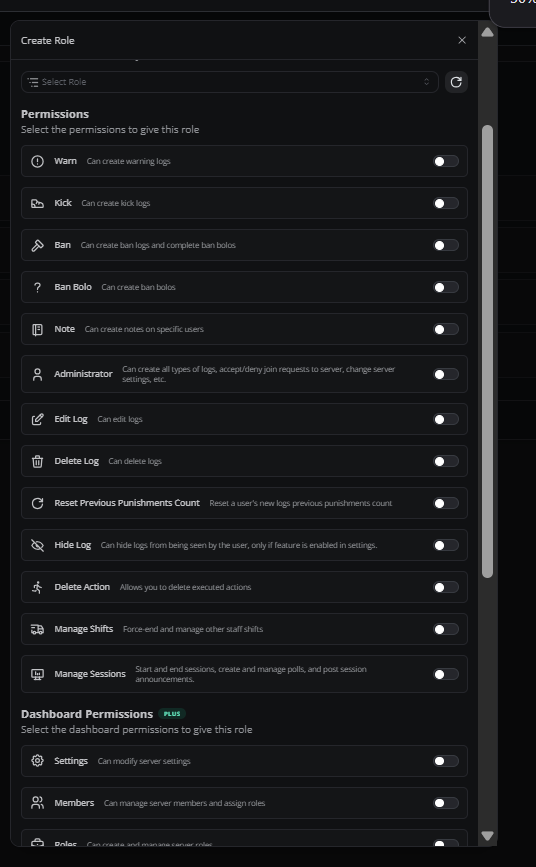
Open the **Roles** page in the dashboard sidebar and click **Create Role**. Name the role and choose its permissions. With [Melonly Plus](https://melonly.xyz/plus), you can link a Discord role so members are added automatically.
### Permissions
| Permission | Description |
| - | - |
| Warn | Create warning logs from the Mod Panel |
| Kick | Create kick logs from the Mod Panel |
| Ban | Create ban logs and complete Ban BOLOs |
| Ban BOLO | Create Ban BOLOs |
| Note | Add notes to players |
| Administrator | Full access except the Danger Zone. Grant it carefully |
| Edit Log | Edit logs |
| Delete Log | Delete logs |
| Hide Log | Hide logs from the player, when players can see their own logs |
| Reset Previous Punishments Count | Reset the previous punishments count on a player's new logs |
| Manage Shifts | Force-end and manage other staff members' shifts |
| Delete Action | Delete executed actions |
| ER:LC Mod | Run mod-level server commands from the Mod Panel. Shown when the ER:LC integration is set up |
| ER:LC Admin | Run admin-level server commands from the Mod Panel. Shown when the ER:LC integration is set up |
| ER:LC Co-Owner | Run co-owner-level server commands from the Mod Panel. Shown when the ER:LC integration is set up |
| Manage Sessions | Start and end sessions, run polls and post session announcements. Shown when sessions are turned on |
### Page Permissions
Page permissions let a role use a dashboard page. They need Plus.
| Permission | Description |
| - | - |
| Settings | Change server settings |
| Members | Manage members and assign roles. Includes Manage Vision Team Seats |
| Roles | Create and manage roles |
| Activity | Manage staff activity |
| Infractions | Use the Infractions module. Includes Issue Infractions and Infractions Settings Manager |
| Reminders & Actions | Create and manage reminders and actions |
| Discord Integration | Manage the linked Discord server and its settings |
| Resources | Manage applications and documents |
| Manage LOAs | Review and manage leave of absence requests |
| ER:LC Integration | Manage the ER:LC integration |
| Audit Logs | View audit logs |
| Server Directory | Manage your Server Directory listing |
| Departments | Manage departments and their settings |
| Advertisers | Manage ad creatives, campaigns and advertiser credits |
***
## Edit a Role
Open the **Roles** page and click a role. You can change everything about it, including the name. Click **View Members** to see who has the role.
 ***
## Role Hierarchy
Roles work like Discord's: a role higher in the list outranks the roles below it. Members at the same level can't approve each other's LOAs or moderate each other.
***
Still have questions? Join our Discord server for support from the Melonly Team.
This documentation is built and hosted on [Mintlify](https://mintlify.com), a developer documentation platform.
***
## Role Hierarchy
Roles work like Discord's: a role higher in the list outranks the roles below it. Members at the same level can't approve each other's LOAs or moderate each other.
***
Still have questions? Join our Discord server for support from the Melonly Team.
This documentation is built and hosted on [Mintlify](https://mintlify.com), a developer documentation platform.