
What is the Dispatch Panel?
The Dispatch panel is your dispatchers’ console. It shows every call and every unit across Police, Fire, EMS and DOT in one place, so you can create calls, assign units and keep everyone informed. Instead of tabs, the whole screen is a workspace you arrange from panels.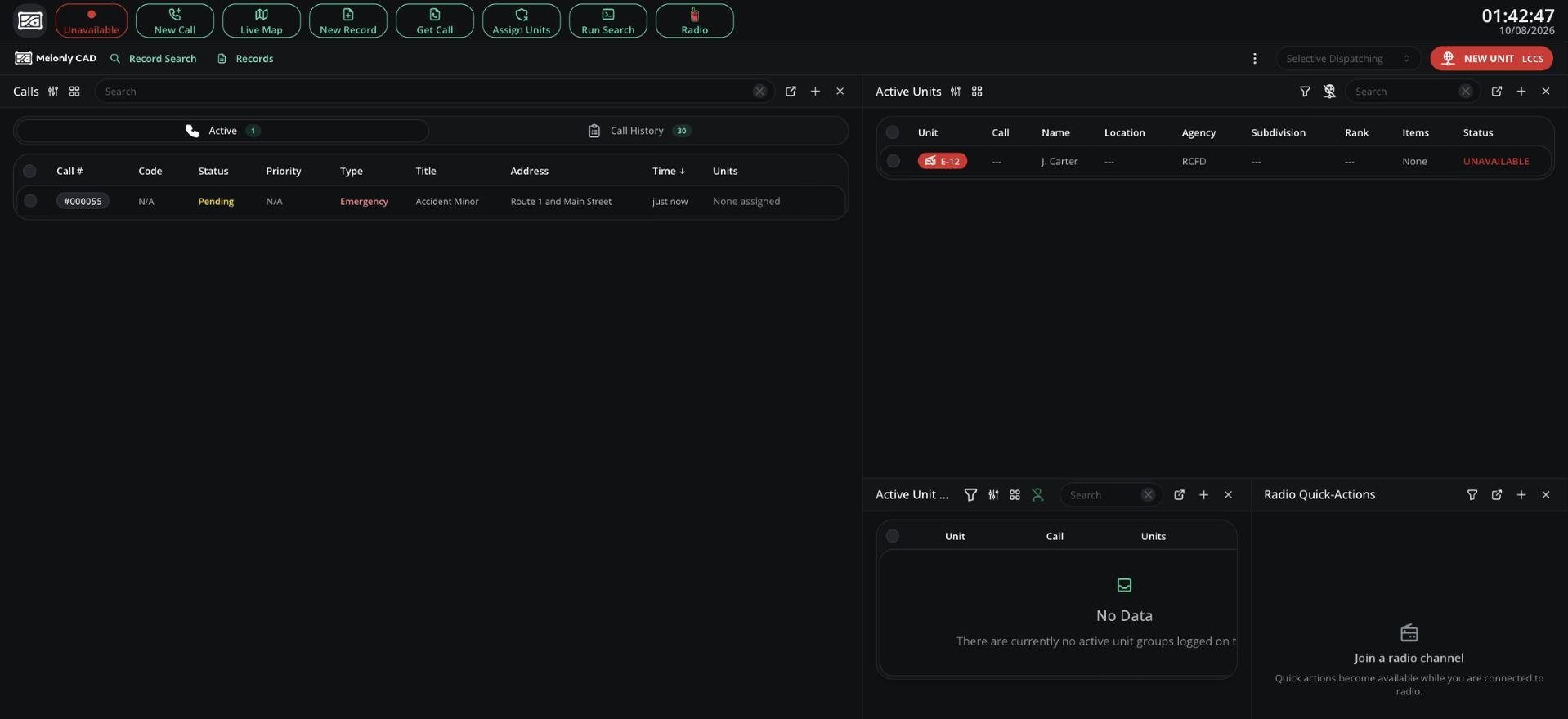
The Dispatch panel
🧭 Quick Navigation
Layouts & Filtering
Build your console from panels, apply presets and use Selective Dispatching.
Dispatch Calls
The calls board, Call Editor, 911 calls, ER:LC calls and call history.
Units Board
Set statuses, assign calls and build groups for any unit.
Live Map & Tools
The live map, notepad, shortcuts, Command Bar and BOLOs.
Related Pages
Tones & Signals
Play tones and put signals into effect.
Lookups
Search records, run checks and send results to units.
Radio
Channels, push-to-talk and Dispatch radio extras.
Access
You need the dispatch panel permission, given on a rank in a Dispatch department. See Permissions.
Top Bar
The top bar works like other panels, with Dispatch-only buttons instead of Self Dispatch, Panic, Traffic Stop and Bodycam.Need help?
Still have questions? Join our Discord server for support from the Melonly Team.