
What are Layouts?
The Dispatch panel has no tabs. Instead, the whole screen is a workspace you build from panels, like the calls board, units, radio groups and timers. Your layout is saved in this browser.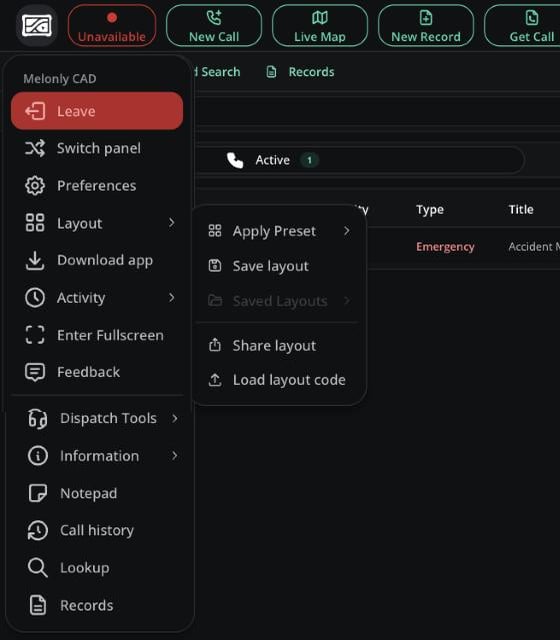
The Layout menu
Applying a Preset
The quickest way to start is a preset. Open CAD menu → Layout → Apply Preset and pick one.Customizing Your Layout
- To add a panel, click + on any panel header, pick the panel, then choose where it goes.
- Each header also lets you detach the panel into a floating window or close it.
- Drag the dividers to resize.
- You can add Active Unit Groups and Radio Quick-Actions more than once, for example one group list per service.
Saving and Sharing
The Layout menu lets you Save layout under a name and load your saved layouts later. Share layout gives you a code another dispatcher can load.Selective Dispatching
Use the Selective Dispatching box in the top bar to focus on certain panels (Police, Fire, EMS, DOT) or certain agencies, but not both at once. Clear it to see everything.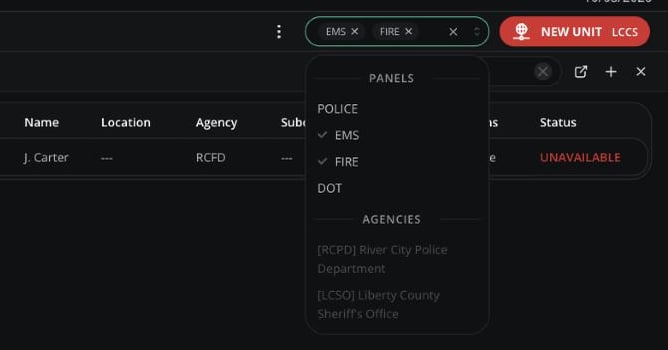
Selective Dispatching
Need help?
Still have questions? Join our Discord server for support from the Melonly Team.