
How the Editor Works
Open a template from Records & Reports to edit it. The Record Preview on the left shows the form exactly as users see it. Anything you type in the preview is saved as a default value. Click Save when you’re done. Layout changes apply to new records, but renaming a template also relabels existing ones.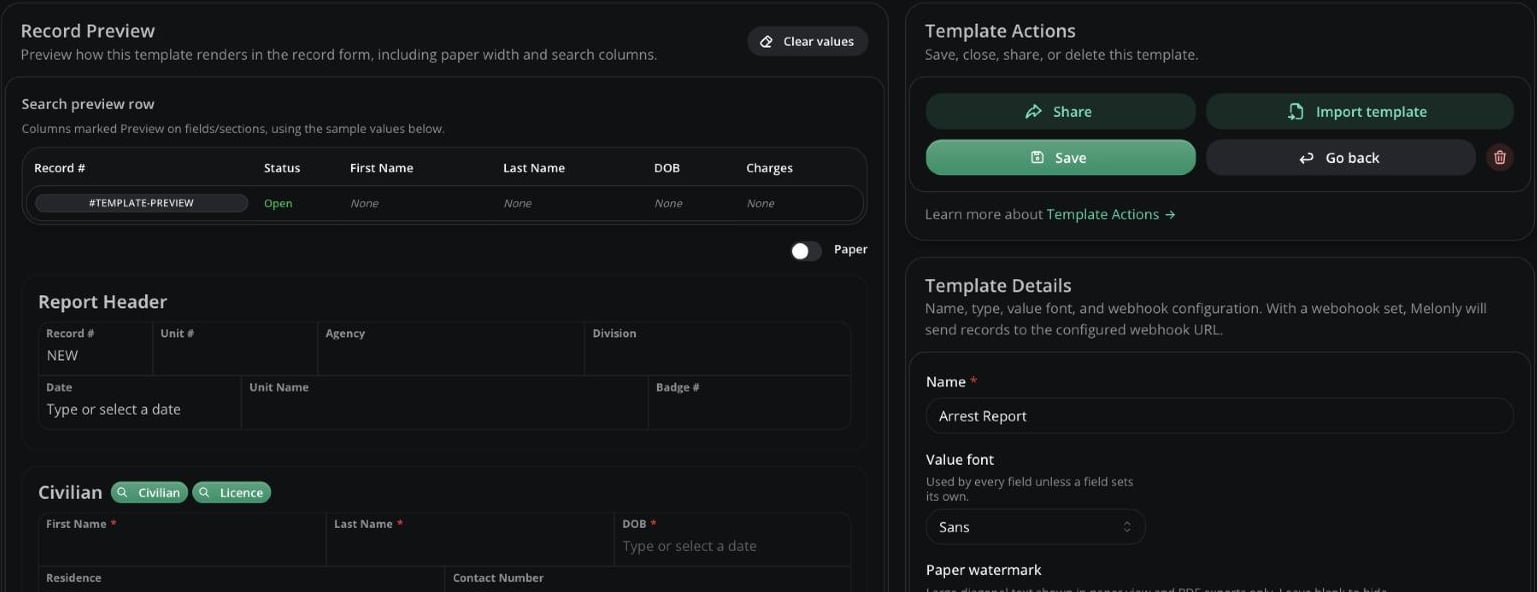
The template editor
Template Details
Charge Options
Charge Options
Available on every type except BOLO and Warrant.
Licence, Vehicle, DMV and Civilian Settings
Licence, Vehicle, DMV and Civilian Settings
RP days follow your law time scale. These settings also apply to existing records.
Discord Webhooks
Discord Webhooks
Save the template first, then click a row to set a Discord webhook URL and optional message text (up to 1800 characters).
For call and unit events, see Webhooks.
Sections
Add sections with Add new section or Add premade section, and drag them to reorder. Every section has a name (up to 64 characters) and border options, and can be duplicated or deleted.Section Types
Section Types
Premade Sections
Premade Sections
Charges Section Settings
Charges Section Settings
Dependencies
Click Edit dependencies on a section or field to hide it until fields in earlier sections match your rules. For example, show a DUI Details section only when Charge Type equals “DUI”. Rules can require all or any to match and compare with Equal, Not Equal or Contains. They only work with text, number and choice fields.Fields
Click + Add a new field in a standard section.Field Types
Field Types
Field Settings
Field Settings
Flags
Flags
Required, Read-only and Supervisor can’t be combined, except a Random field can be required and read-only. A unique field can’t be read-only.
Matchers
Matchers link a field to other data, such asfirst_name or veh_plate. They power search fill, lookups and search indices. Use lowercase letters and underscores. See Record Mappings for how they work in detail.
Required Fields
Some types need exactly one field with each of these matchers. Each must be required, not read-only, not hidden by a dependency and not in a duplicatable section.Need help?
Still have questions? Join our Discord server for support from the Melonly Team.