
What is Raid Rollback?
Raid Rollback reverts the damage from a raid, such as mass bans or permissions handed out to the wrong people. Melonly runs the opposite command for each action you pick.How to Use Raid Rollback
Find Raid Rollback on the ER:LC Integration → API page, below Server Configuration.1
Start the Rollback
Click Initiate raid rollback, then click Continue.
2
Pick the Raider
Search for the player who ran the raid by their Roblox username.
3
Enter the Start Time
Enter roughly when the raider ran their first command.
4
Pick the Commands Used
Choose the commands the raider used:
helper, unhelper, mod, unmod, admin, unadmin, ban and unban. Then submit.5
Perform the Rollback
Choose the commands you want to revert, click Perform Rollback, then click Submit. Melonly runs the counter-command for each one, such as
unban for ban or unmod for mod.At least one player must be in your private server for a rollback to run. Commands run through Remote Server Management can’t be rolled back. To find who started a raid, search for the command (for example
:ban all) in the Mod Panel.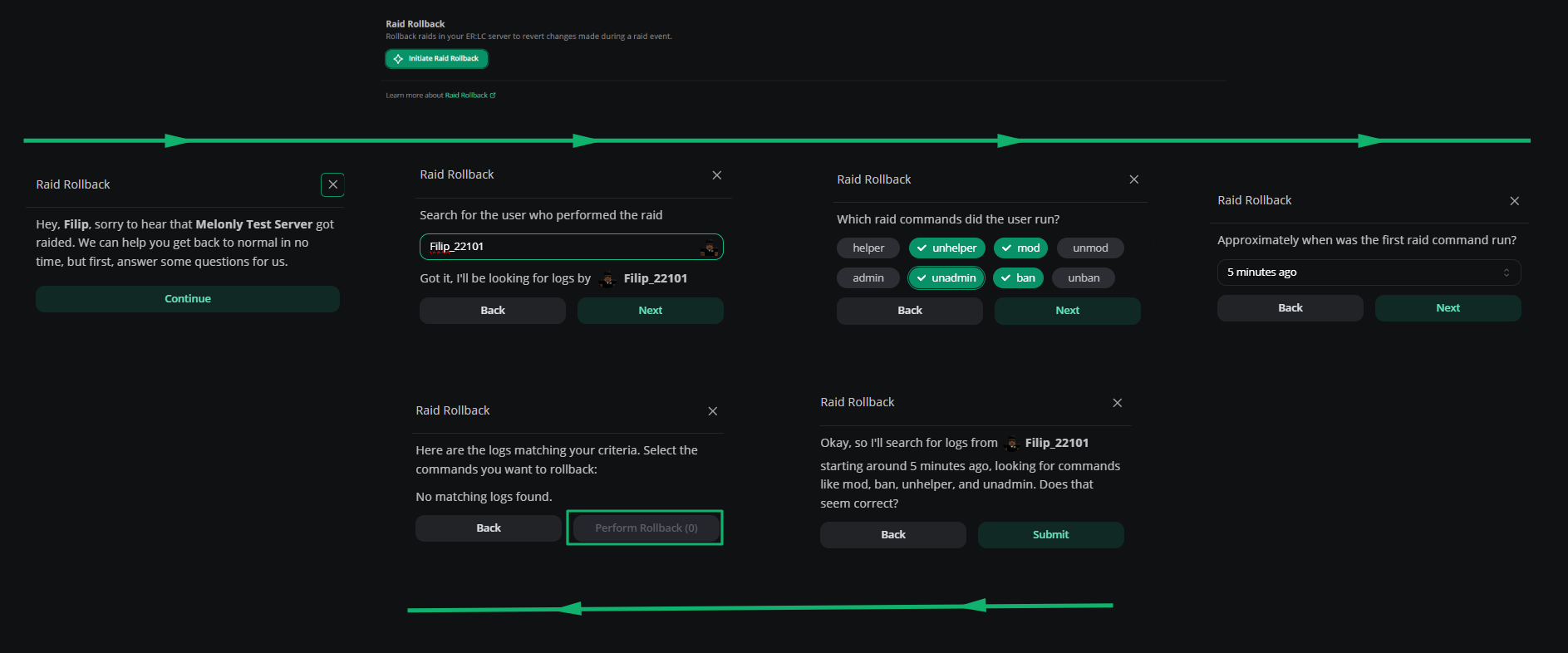
Raid rollback
Need help?
Still have questions? Join our Discord server for support from the Melonly Team.